Service Architecture
The Open OnDemand Service has three roles and uses two Virtual Networks. Each user session runs as a Slurm job on a pool of compute VMs that grows and shrinks.
Roles
| Role | Cardinality | What it runs |
|---|---|---|
storage |
1 | NFS server for the shared home directories, the state of the Slurm controller and the shared software directory. Squid cache for the EESSI catalogue, unless the service uses a proxy of the site |
portal |
1 | Open OnDemand, its LDAP directory, Dex, the Slurm controller slurmctld, the accounting daemon slurmdbd with MariaDB, the Prometheus metrics exporter |
worker |
1 to 6, elastic | slurmd, joined to the cluster as a dynamic node, and the user sessions as Slurm jobs |
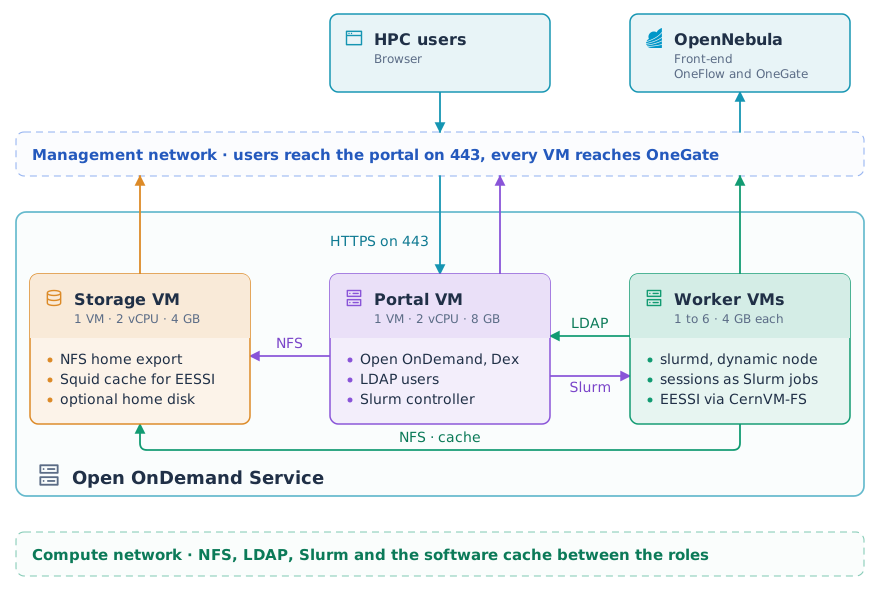
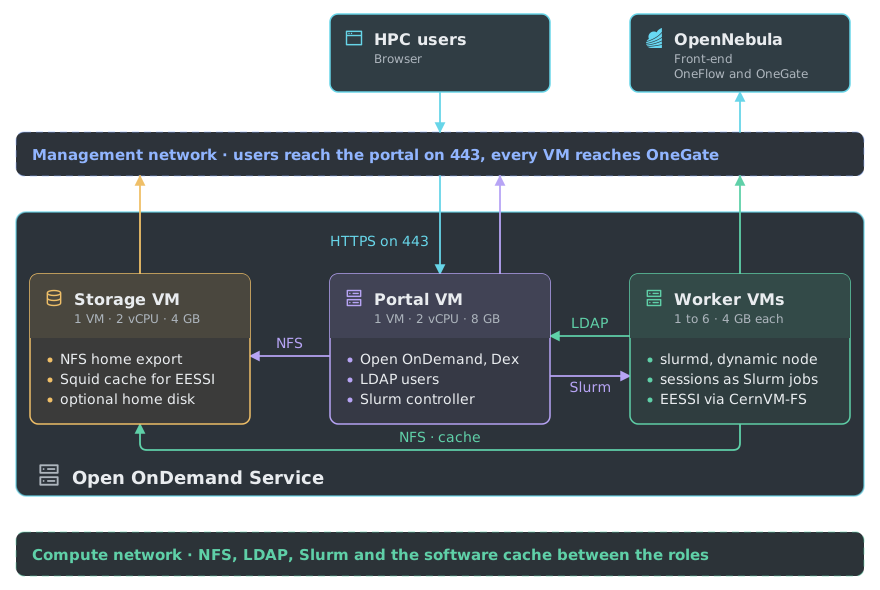
OneFlow starts storage first. It starts portal when the storage role is ready, and worker when both are ready. Each role reports READY through OneGate only when it is actually serving. The service therefore reaches RUNNING when a user can sign in and open a session.
Networks
Every VM has two network interfaces:
- Management network. It reaches OneGate and the Internet. The portal publishes its web interface here, and the storage role downloads the software catalogue through it.
- Compute network. It is reserved for the service. It carries NFS, LDAP, the Slurm traffic between the controller and the nodes, the proxied sessions and the software cache.
No address is fixed in advance. OneFlow gives each role the compute address of the roles it depends on. The storage role asks OneGate which VM is the portal.
A worker joins the Slurm cluster on its own at boot. A reconciler on the portal removes the node of any VM that has left the service.
The portal uses the whole /24 around its compute address as the worker range, so keep that network reserved for the service. A larger network needs ONEAPP_POOL_RANGE, described in Configuration.
How a Session Runs
- The user signs in. Dex checks the credentials against the LDAP directory, or against an external OpenID Connect provider. Open OnDemand then starts a web server for that user, running as their Unix account.
- The user launches an application and picks cores, memory and session hours. Cores and memory are limited to what the largest worker has. The portal submits the session script with
sbatchas the user. It requests one node, the cores and memory chosen, and GPUs if the pool has any. - Slurm starts the script on a worker that has those cores and that memory free. If no worker does, the job waits in the queue and the card shows it as queued until a worker becomes free or OneFlow adds one. The job runs as the user under
slurmd, with the home directory and the EESSI catalogue mounted. Slurm uses cgroup v2 to limit the job to the cores and memory it requested. No other session shares its cores, and a process that uses more memory than requested is stopped. - The application listens on a port of the worker and publishes the compute address of the worker. The portal proxies the browser to it. Desktops run under a TurboVNC server on the worker and reach the browser through noVNC on the portal.
- Deleting the session cancels the job. Reaching the session hours ends it. In both cases Slurm stops every process of the job, so nothing of the session stays on the worker.
A job is never moved to another worker, because the browser connection points to the worker that started it. Every job is recorded in the accounting database. Active Jobs lists the sessions, and the Job Composer submits batch jobs of your own to the same cluster.
How the Pool Grows and Shrinks
Every worker publishes these attributes to OneGate every 30 seconds:
| Attribute | Meaning |
|---|---|
SLURM_PENDING |
Jobs waiting for a worker of this role, the same figure on every worker |
ACTIVE_SESSIONS |
Jobs running on this worker |
IDLE_SECONDS |
Seconds since the last job on this worker ended |
OLDEST_IDLE |
1 when the oldest worker of the role is drained and empty, so OneFlow may remove it |
SLURM_IDLE_NODES, SLURM_ALLOC_NODES |
Nodes of the cluster without a job, and nodes with one |
HEALTHY |
1 when the home mount, the software catalogue, munge and slurmd are all ready |
SESSION_USERS |
The user and the start time of each job on this worker |
SLURM_NODENAME |
The node name of this worker, published once at boot. The reconciler on the portal matches it against the cluster |
OneFlow reads the figures of every worker and applies the rules of the worker role. The numbers are the ones of the marketplace template.
Scaling up. OneFlow adds one worker when SLURM_PENDING is above 0 in two consecutive readings, and then waits 120 seconds before it reads again, so one pending job adds one VM and that VM has time to boot. OneFlow reads the figures every autoscaler_interval seconds, 90 by default in /etc/one/oneflow-server.conf on the Front-end. With the 30 the Requirements recommend, a pending job has its worker in about a minute and a half, and each further pending job a few minutes later. A job that no worker could ever run does not count. A GPU request on a pool without GPUs is refused at submit time, and a job that asks for more cores than any worker has waits with the reason PartitionConfig, which the workers leave out of SLURM_PENDING.
Scaling down. OneFlow always removes the oldest VM of a role, without draining it, so the appliance drains first. When the oldest worker has had no job for ONEAPP_WORKER_IDLE_SECONDS (ten minutes by default) and the queue is empty, it drains its own Slurm node. While that node is drained and empty, every worker publishes OLDEST_IDLE as 1, and OneFlow removes the VM when the average stays above 0.99 in two readings 60 seconds apart. The node leaves the cluster when the VM shuts down. Three guards apply. A worker never drains while the role is at min_vms. A drained node returns to service when a job appears, or when OneFlow has not removed it after ONEAPP_WORKER_DRAIN_SECONDS (ten minutes by default). A reconciler on the portal runs every 30 seconds and deletes any node whose VM has left the service and holds no job. On the testbed a scale down removed exactly the drained VM, and the job on the other worker kept running.
The pool changes one VM at a time between 1 and max_vms, six in the marketplace template.
Requirements
- OpenNebula 6.10 or later with OneFlow and OneGate enabled, and the OneGate endpoint reachable from the service networks.
- The two Virtual Networks above. The compute network is reserved for the service and no larger than a /24, unless you set
ONEAPP_POOL_RANGE. If a firewall sits between the networks, the roles need NFS (2049) and the software cache (3128) on the storage VM, LDAP (389) and the Slurm controller (6817) on the portal,slurmd(6818) and the session ports on the workers, and OneGate (5030 by default) from every VM. - Outbound HTTP from the storage role to the EESSI CernVM-FS servers.
- Capacity for three VMs plus the workers you expect. The marketplace template gives every VM 2 vCPU and 4 GB of memory, and 8 GB to the portal, which runs the Slurm controller and MariaDB beside Open OnDemand and used 710 MB of its 7941 MB with everything up on the testbed. The VM template passes the CPU of the host through to the VMs (
CPU_MODELset tohost-passthrough), so EESSI loads the software built for that CPU family. Every worker of a role has the same size, and a session cannot request more than one worker has. - For a faster scale up, set
:autoscaler_interval: 30in/etc/one/oneflow-server.confon the Front-end and restartopennebula-flow. OneFlow then reads the figures of the workers every 30 seconds instead of 90. This is a setting of the Front-end, made once for every service that runs on it, and the appliance cannot set it.
The Munge Key
Munge is how the portal and the workers trust each other. Every Slurm message carries a token signed with one secret key that all the VMs share. The portal creates the key at first boot (1024 random bytes) and keeps it on the storage export, so a replaced portal uses the same key. It also publishes the key, base64 encoded, as SLURM_MUNGE_KEY in the user template of the portal VM through OneGate, and every worker reads it from there at boot.
Anyone who can read the template of the portal VM in OpenNebula can read the key, and with the key they can act as any user towards the cluster. The Elastic Slurm service has the same exposure. Restrict who can see the VMs of the service. Inside the VMs the key and the OneGate token are readable by root only, so a session user cannot read them.
GIVE FEEDBACK
Was this resource helpful?
Glad to hear it
Sorry to hear that