Virtual Machine States Reference
This page is a complete reference of all the VM states that will be useful for developers and administrators doing troubleshooting.
The simplified life cycle is explained in Virtual Machine Instances. That simplified guide uses a smaller number of state names. The names here are the ones used by onevm list, e.g., prolog, prolog_migrate, and prolog_resume are all presented as prol. This section is intended as a reference for end users. However, the information in the Virtual Machine Instances guide should be enough for everyday administration tasks.
List of States
In OpenNebula a Virtual Machine has two variables to define its state: STATE and LCM_STATE. The LCM_STATE is only relevant when the STATE is ACTIVE. Both states can be seen from the CLI (onevm show) and from Sunstone (Info panel for the VM).
LCM_INIT state is used as LCM_STATE when the VM is in a state different than ACTIVE.
| # | State | # | LCM State | Short State Alias | Meaning |
|---|---|---|---|---|---|
| 0 | INIT | init |
Internal initialization state right after VM creation, this state is not visible for the end users. And hence this state cannot be used to hook any action. | ||
| 1 | PENDING | pend |
By default a VM starts in the pending state, waiting for a resource to run on. It will stay in this state until the scheduler decides to deploy it or the user deploys it using the onevm deploy command. |
||
| 2 | HOLD | hold |
The owner has held the VM and it will not be scheduled until it is released. It can be, however, deployed manually. | ||
| 3 | ACTIVE | 0 | LCM_INIT | init |
Internal initialization state, not visible for the end users. |
| 1 | PROLOG | prol |
The system is transferring the VM files (disk images and the recovery file) to the Host in which the Virtual Machine will be running. | ||
| 2 | BOOT | boot |
OpenNebula is waiting for the hypervisor to create the VM. | ||
| 3 | RUNNING | runn |
The VM is running (note that this stage includes the internal virtualized machine booting and shutting down phases). In this state, the virtualization driver will periodically monitor it. | ||
| 4 | MIGRATE | migr |
The VM is migrating from one Host to another. This is a hot migration. | ||
| 5 | SAVE_STOP | save |
The system is saving the VM files after a stop operation. | ||
| 6 | SAVE_SUSPEND | save |
The system is saving the VM files after a suspend operation. | ||
| 7 | SAVE_MIGRATE | save |
The system is saving the VM files for a cold migration. | ||
| 8 | PROLOG_MIGRATE | migr |
File transfers during a cold migration. | ||
| 9 | PROLOG_RESUME | prol |
File transfers after a resume action (from stopped). | ||
| 10 | EPILOG_STOP | epil |
File transfers from the Host to the system datastore. | ||
| 11 | EPILOG | epil |
The system cleans up the Host used to virtualize the VM, and additionally disk images to be saved are copied back to their datastores. | ||
| 12 | SHUTDOWN | shut |
OpenNebula has sent the VM the shutdown ACPI signal and is waiting for it to complete the shutdown process. If after a timeout period the VM does not disappear, OpenNebula will assume that the guest OS ignored the ACPI signal and the VM state will be changed to running instead of done. | ||
| 15 | CLEANUP_RESUBMIT | clea |
Clean up after a delete-recreate action. | ||
| 16 | UNKNOWN | unkn |
The VM couldn’t be monitored, it is in an unknown state. | ||
| 17 | HOTPLUG | hotp |
A disk attach/detach operation is in progress. | ||
| 18 | SHUTDOWN_POWEROFF | shut |
OpenNebula has sent the VM the shutdown ACPI signal and is waiting for it to complete the shutdown process. If after a timeout period the VM does not disappear, OpenNebula will assume that the guest OS ignored the ACPI signal and the VM state will be changed to running instead of poweroff. | ||
| 19 | BOOT_UNKNOWN | boot |
OpenNebula is waiting for the hypervisor to create the VM (from UNKNOWN). | ||
| 20 | BOOT_POWEROFF | boot |
OpenNebula is waiting for the hypervisor to create the VM (from POWEROFF). | ||
| 21 | BOOT_SUSPENDED | boot |
OpenNebula is waiting for the hypervisor to create the VM (from SUSPENDED). | ||
| 22 | BOOT_STOPPED | boot |
OpenNebula is waiting for the hypervisor to create the VM (from STOPPED). | ||
| 23 | CLEANUP_DELETE | clea |
Cleanup after a delete action. | ||
| 24 | HOTPLUG_SNAPSHOT | snap |
A system snapshot action is in progress. | ||
| 25 | HOTPLUG_NIC | hotp |
A NIC attach/detach operation is in progress. | ||
| 26 | HOTPLUG_SAVEAS | hotp |
A disk-saveas operation is in progress. | ||
| 27 | HOTPLUG_SAVEAS_POWEROFF | hotp |
A disk-saveas operation (from POWEROFF) is in progress. | ||
| 28 | HOTPLUG_SAVEAS_SUSPENDED | hotp |
A disk-saveas operation (from SUSPENDED) is in progress. | ||
| 29 | SHUTDOWN_UNDEPLOY | shut |
OpenNebula has sent the VM the shutdown ACPI signal and is waiting for it to complete the shutdown process. If after a timeout period the VM does not disappear, OpenNebula will assume that the guest OS ignored the ACPI signal and the VM state will be changed to running instead of undeployed. | ||
| 30 | EPILOG_UNDEPLOY | epil |
The system cleans up the Host used to virtualize the VM, and VM files are transferred to the system datastore. | ||
| 31 | PROLOG_UNDEPLOY | prol |
File transfers after a resume action (from undeployed). | ||
| 32 | BOOT_UNDEPLOY | boot |
OpenNebula is waiting for the hypervisor to create the VM (from UNDEPLOY). | ||
| 33 | HOTPLUG_PROLOG_POWEROFF | hotp |
File transfers for a disk attach from poweroff. | ||
| 34 | HOTPLUG_EPILOG_POWEROFF | hotp |
File transfers for a disk detach from poweroff. | ||
| 35 | BOOT_MIGRATE | boot |
OpenNebula is waiting for the hypervisor to create the VM (from a cold migration). | ||
| 36 | BOOT_FAILURE | fail |
Failure during a BOOT. | ||
| 37 | BOOT_MIGRATE_FAILURE | fail |
Failure during a BOOT_MIGRATE. | ||
| 38 | PROLOG_MIGRATE_FAILURE | fail |
Failure during a PROLOG_MIGRATE. | ||
| 39 | PROLOG_FAILURE | fail |
Failure during a PROLOG. | ||
| 40 | EPILOG_FAILURE | fail |
Failure during an EPILOG. | ||
| 41 | EPILOG_STOP_FAILURE | fail |
Failure during an EPILOG_STOP. | ||
| 42 | EPILOG_UNDEPLOY_FAILURE | fail |
Failure during an EPILOG_UNDEPLOY. | ||
| 43 | PROLOG_MIGRATE_POWEROFF | migr |
File transfers during a cold migration (from POWEROFF). | ||
| 44 | PROLOG_MIGRATE_POWEROFF_FAILURE | fail |
Failure during a PROLOG_MIGRATE_POWEROFF. | ||
| 45 | PROLOG_MIGRATE_SUSPEND | migr |
File transfers during a cold migration (from SUSPEND). | ||
| 46 | PROLOG_MIGRATE_SUSPEND_FAILURE | fail |
Failure during a PROLOG_MIGRATE_SUSPEND. | ||
| 47 | BOOT_UNDEPLOY_FAILURE | fail |
Failure during a BOOT_UNDEPLOY. | ||
| 48 | BOOT_STOPPED_FAILURE | fail |
Failure during a BOOT_STOPPED. | ||
| 49 | PROLOG_RESUME_FAILURE | fail |
Failure during a PROLOG_RESUME. | ||
| 50 | PROLOG_UNDEPLOY_FAILURE | fail |
Failure during a PROLOG_UNDEPLOY. | ||
| 51 | DISK_SNAPSHOT_POWEROFF | snap |
A disk-snapshot-create action (from POWEROFF) is in progress. | ||
| 52 | DISK_SNAPSHOT_REVERT_POWEROFF | snap |
A disk-snapshot-revert action (from POWEROFF) is in progress. | ||
| 53 | DISK_SNAPSHOT_DELETE_POWEROFF | snap |
A disk-snapshot-delete action (from POWEROFF) is in progress. | ||
| 54 | DISK_SNAPSHOT_SUSPENDED | snap |
A disk-snapshot-create action (from SUSPENDED) is in progress. | ||
| 55 | DISK_SNAPSHOT_REVERT_SUSPENDED | snap |
A disk-snapshot-revert action (from SUSPENDED) is in progress. | ||
| 56 | DISK_SNAPSHOT_DELETE_SUSPENDED | snap |
A disk-snapshot-delete action (from SUSPENDED) is in progress. | ||
| 57 | DISK_SNAPSHOT | snap |
A disk-snapshot-create action (from RUNNING) is in progress. | ||
| 59 | DISK_SNAPSHOT_DELETE | snap |
A disk-snapshot-delete action (from RUNNING) is in progress. | ||
| 60 | PROLOG_MIGRATE_UNKNOWN | migr |
File transfers during a cold migration (from UNKNOWN). | ||
| 61 | PROLOG_MIGRATE_UNKNOWN_FAILURE | fail |
Failure during a PROLOG_MIGRATE_UNKNOWN. | ||
| 62 | DISK_RESIZE | dsrz |
Disk resize with the VM on RUNNING state. | ||
| 63 | DISK_RESIZE_POWEROFF | dsrz |
Disk resize with the VM on POWEROFF state. | ||
| 64 | DISK_RESIZE_UNDEPLOYED | dsrz |
Disk resize with the VM UNDEPLOYED. | ||
| 65 | HOTPLUG_NIC_POWEROFF | hotp |
A NIC attach/detach operation (from POWEROFF) is in progress. | ||
| 66 | HOTPLUG_RESIZE | hotp |
Hotplug resize VCPU and memory is in progress. | ||
| 67 | HOTPLUG_SAVEAS_UNDEPLOYED | hotp |
A disk-saveas operation (from UNDEPLOYED) is in progress. | ||
| 68 | HOTPLUG_SAVEAS_STOPPED | hotp |
A disk-saveas operation (from STOPPED) is in progress. | ||
| 69 | BACKUP | back |
A backup operation is in progress (VM running). | ||
| 70 | BACKUP_POWEROFF | back |
A backup operation is in progress (VM poweroff). | ||
| 71 | RESTORE | rest |
A VM disks are restored from backup image. | ||
| 4 | STOPPED | stop |
The VM is stopped. VM state has been saved and it has been transferred back along with the disk images to the system datastore. | ||
| 5 | SUSPENDED | susp |
Same as stopped, but the files are left in the Host to later resume the VM there (i.e. there is no need to re-schedule the VM). | ||
| 6 | DONE | done |
The VM is done. VMs in this state won’t be shown with onevm list but are kept in the database for accounting purposes. You can still get their information with the onevm show command. |
||
| 8 | POWEROFF | poff |
Same as suspended, but no checkpoint file is generated. Note that the files are left in the Host to later boot the VM there. When the VM guest is shut down, OpenNebula will put the VM in this state. | ||
| 9 | UNDEPLOYED | unde |
The VM is shut down. Similar to STOPPED, but no checkpoint file is generated. The VM disks are transferred to the system datastore. The VM can be resumed later. | ||
| 10 | CLONING | clon |
The VM is waiting for one or more disk images to finish the initial copy to the repository (image state still in lock). |
||
| 11 | CLONING_FAILURE | fail |
Failure during a CLONING. One or more of the images went into the ERROR state. |
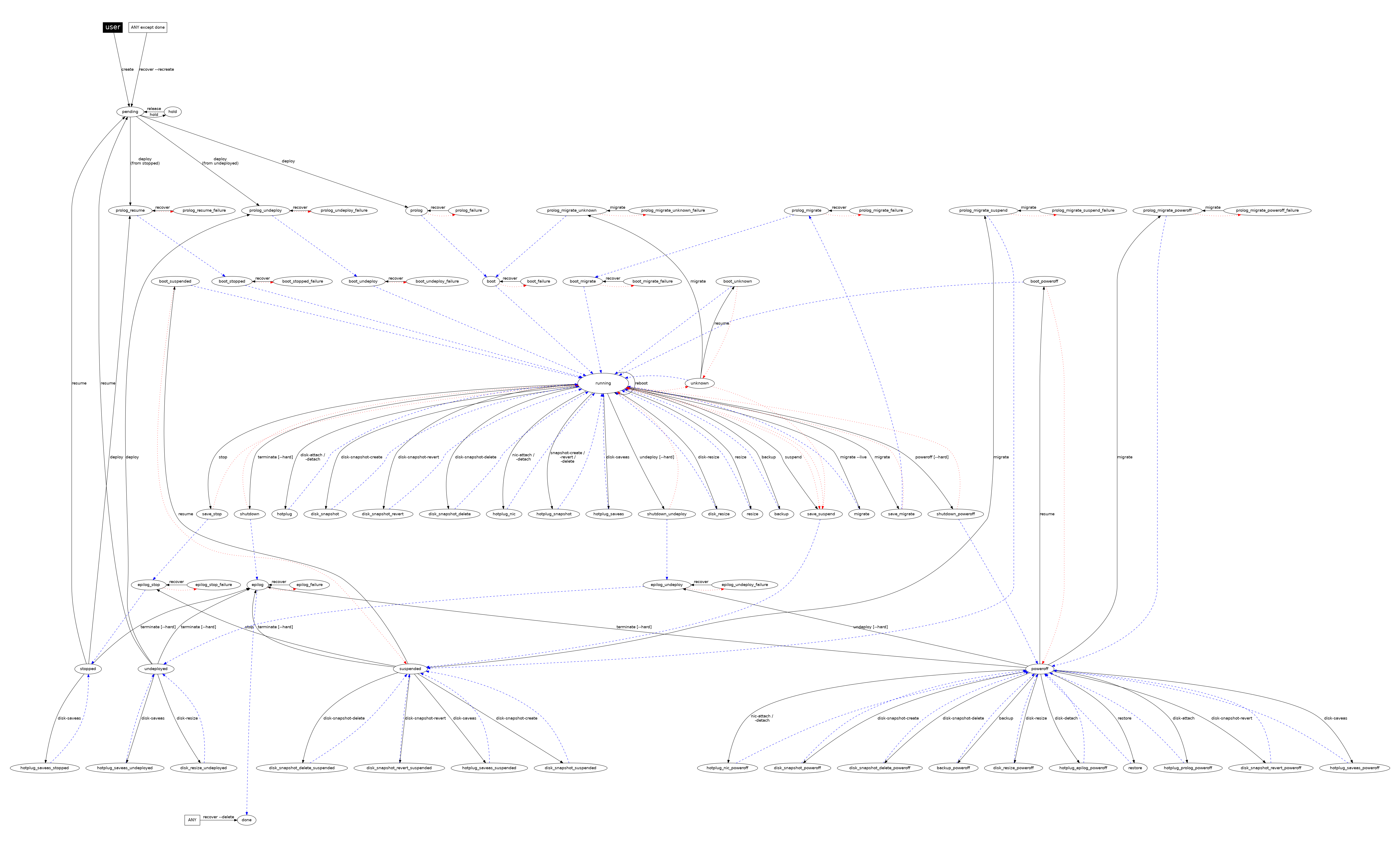
Diagram
You can click on the following image to zoom into it.
GIVE FEEDBACK
Was this resource helpful?
Glad to hear it
Sorry to hear that