Virtual Machine Template
A template file consists of a set of attributes that defines a Virtual Machine. Using the command onetemplate create, a template can be registered in OpenNebula to be instantiated later. For compatibility with previous versions, you can also create a new Virtual Machine directly from a template file by using the onevm create command.
oneadmin group. These attributes can be configured in oned.conf. In the following tables, default attributes are marked with *. For the complete list, see the Restricted Attributes section.
Syntax
The syntax of the template file is as follows:
-
Anything after a hash (or pound) sign
#on a line is a comment. -
Strings are delimited with double quotes
", if a double quote is part of the string it needs to be escaped\\". -
Single Attributes are in the form:
NAME=VALUE -
Vector Attributes that contain several values can be defined as follows:
NAME=[NAME1=VALUE1,NAME2=VALUE2] -
Vector Attributes must contain at least one value.
-
The following values are permitted for attribute names:
- Letters:
A-Z(lowercase letters are allowed, but are automatically capitalized internally) - Digits:
0-9 - Underscore:
_
- Letters:
XML Syntax
Template files can be expressed in XML, with the following syntax:
-
The root element must be
TEMPLATE. -
Single Attributes are in the form:
<NAME>VALUE</NAME> -
Vector Attributes that contain several values can be defined as follows:
<NAME>
  <NAME1>VALUE1</NAME1>
  <NAME2>VALUE2</NAME2>
</NAME>
A simple example:
<TEMPLATE>
  <NAME>test_vm</NAME>
  <CPU>2</CPU>
  <MEMORY>1024</MEMORY>
  <DISK>
    <IMAGE_ID>2</IMAGE_ID>
  </DISK>
  <DISK>
    <IMAGE>Data</IMAGE>
    <IMAGE_UNAME>oneadmin</IMAGE_UNAME>
  </DISK>
</TEMPLATE>
Capacity Section
The following attributes can be defined to specify the capacity of a VM.
| Attribute | Description | Mandatory |
|---|---|---|
NAME |
Name that the VM will get for description purposes. If NAME is not supplied a name generated by one will be in the form of one-<VID>. NOTE: When defining a template it is the name of the VM template. The actual name of the VM will be set when the VM template is instantiated. |
YES For Templates NO For VMs - will be set to one- |
MEMORY |
Amount of RAM required for the VM, in Megabytes. | YES |
CPU |
Percentage of CPU divided by 100 required for the Virtual Machine, half a processor is written 0.5. This value is used by OpenNebula and the scheduler to guide the Host overcommitment. | YES |
VCPU |
Number of virtual CPUs. This value is optional, the default hypervisor behavior is used, usually one virtual CPU. | YES - will be set to 1 if omitted, this can be changed in the driver configuration |
For example:
NAME   = test-vm
MEMORY = 128
CPU    = 1
Hotplug Resize VM Capacity
If you need to resize the capacity in RUNNING state you have to set up some extra attributes in the VM template. These attributes must be set before the VM is started. They are driver-specific, here you can find more info for KVM.
Showback Section
The following attributes can be defined to set the cost of a VM. Read the showback documentation for more information.
| Attribute | Description | Mandatory |
|---|---|---|
MEMORY_COST |
Cost of each memory MB per hour. | NO |
CPU_COST |
Cost of each CPU per hour. | NO |
DISK_COST |
Cost of each disk MB per hour. | NO |
OS and Boot Options Section
The operating system is defined with the OS vector attribute. The following sub-attributes are supported:
- not supported for that hypervisor.
| OS Sub-Attribute | Description | KVM | LXC |
|---|---|---|---|
ARCH |
CPU architecture to virtualize. | M (default i686) | - |
MACHINE |
libvirt machine type. Check libvirt capabilities for the list of available machine types. | O | - |
KERNEL |
path to the OS kernel to boot the image in the Host. | O | - |
KERNEL_DS |
image to be used as kernel (see !!) | O | - |
INITRD |
path to the initrd image in the Host. | O (for kernel) | - |
INITRD_DS |
image to be used as ramdisk (see !!) | O (for kernel) | - |
ROOT |
device to be mounted as root. | O (for kernel) | - |
KERNEL_CMD |
arguments for the booting kernel. | O (for kernel) | - |
BOOTLOADER |
path to the bootloader executable. | O | - |
BOOT |
comma-separated list of boot devices types, by order of preference (first device in the list is the first device used for boot). Possible values: disk#,nic#. |
M | O |
SD_DISK_BUS |
bus for disks with sd prefix, either scsi or sata. If attribute is missing, libvirt chooses itself. |
O | - |
UUID |
unique ID of the VM. It’s referenced as machine ID inside the VM. Could be used to force ID for licensing purposes. | O | - |
FIRMWARE |
firmware type or firmware path. Possible values: BIOS, UEFI or path. |
O | - |
FIRMWARE_FORMAT |
desired UEFI NVRAM image format. Possible values: qcow2 or raw (default). |
O | - |
FIRMWARE_SECURE |
enable Secure Boot. Possible values: true, false. |
O | - |
(!!) Use one of KERNEL_DS or KERNEL (and INITRD or INITRD_DS).
KERNEL_DS and INITRD_DS refer to an image registered in a File Datastore and must be of type KERNEL and RAMDISK, respectively. The image should be referred to using one of the following:
$FILE[IMAGE=<image name>], to select the user’s own files.$FILE[IMAGE=<image name>, <IMAGE_UNAME|IMAGE_UID>=<owner name|owner id>], to select images owned by other users, by user name or uid.$FILE[IMAGE_ID=<image id>], global file selection.
Here’s an example of a VM booting from sda1 with kernel /vmlinuz:
OS = [ KERNEL     = /vmlinuz,
       INITRD     = /initrd.img,
       ROOT       = sda1,
       KERNEL_CMD = "ro console=tty1"]
OS = [ KERNEL_DS  = "$FILE[IMAGE=\"kernel 3.6\"]",
       INITRD_DS  = "$FILE[IMAGE=\"initrd 3.6\"]",
       ROOT       = sda1,
       KERNEL_CMD = "ro console=tty1"]
CPU_MODEL Options Section
This section (CPU_MODEL) configures the hardware configuration of the CPU exposed to the guest.
- not supported for that hypervisor.
| Sub-Attribute | Description | KVM | LXC |
|---|---|---|---|
MODEL |
The CPU model exposed to the guest. Host-passthrough is the same model as the Host. Available modes are stored in the Host information and obtained through monitor. | O | - |
FEATURES |
The CPU features required by the guest. This a comma-separated list of values of the CPU features in a Virtual Machine. Available features are stored in the Host information and obtained through monitor. | O | - |
Features Section
This section configures the features enabled for the VM.
- not supported for that hypervisor.
| Sub-Attribute | Description | KVM | LXC |
|---|---|---|---|
PAE |
Physical address extension mode allows 32-bit guests to address more than 4 GB of memory. | O | - |
ACPI |
Useful for power management, for example, with KVM guests it is required for graceful shutdown to work. | O | - |
APIC |
Enables the advanced programmable IRQ management. Useful for SMP machines. | O | - |
LOCALTIME |
The guest clock will be synchronized to the Host’s configured timezone when booted. Useful for Windows VMs. | O | - |
HYPERV |
Add hyperv extensions to the VM. The options can be configured in the driver configuration, HYPERV_OPTIONS. Also, timers as configured in HYPERV_TIMERS are added to the domain clock. |
O | - |
GUEST_AGENT |
Enables the QEMU Guest Agent communication. This only creates the socket inside the VM, the Guest Agent itself must be installed and started in the VM. | O | - |
VIRTIO_SCSI_QUEUES |
Number of queues for the virtio-scsi controller. | O | - |
VIRTIO_BLK_QUEUES |
Number of dispatch queues for the virtio-blk driver. | O | - |
IOTHREADS |
Number of iothreads for virtio disks. By default threads will be assigned to disk by round robin algorithm. Disk thread id can be forced by disk IOTHREAD attribute. |
O | - |
MIGRATE_AUTO_CONVERGE |
Auto-converge configuration for live migration. Format: <initial>[,<increment>] with values ranging from 0 to 100. When defined, implicitly enables the --auto-converge option during migration. Maps to the virsh migrate --auto-converge-initial and --auto-converge-increment options. |
O | - |
MIGRATE_COMPRESSED |
Enable compression during live migration. When set to yes, the VM memory will be compressed during migration to reduce bandwidth usage. Maps to the virsh migrate --compressed option. |
O | - |
When setting up the virtio-scsi or virtio-blk queues, you can use the keyword auto which defaults to the number of vCPUs defined in the Virtual Machine. Also, the virtio-blk queues can be overridden per DISK so you can enable the multi-queue feature for the selected disks only.
FEATURES = [
    PAE = "yes",
    ACPI = "yes",
    APIC = "no",
    GUEST_AGENT = "yes",
    VIRTIO_SCSI_QUEUES = "auto",
    VIRTIO_BLK_QUEUES = "auto",
    MIGRATE_AUTO_CONVERGE = "10,5",
    MIGRATE_COMPRESSED = "yes"
]
Disks Section
The disks of a VM are defined with the DISK vector attribute. You can define as many DISK attributes as you need. There are three types of disks:
- Persistent disks, uses an Image registered in a Datastore mark as persistent.
- Clone disks, uses an Image registered in a Datastore. Changes to the Images will be discarded. A clone disk can be saved as other Image.
- Volatile disks, created on-the-fly on the target Hosts. Disks are disposed when the VM is shut down and cannot be saved_as.
Persistent and Clone Disks
- not supported for that hypervisor.
| DISK Sub-Attribute | Description | KVM | LXC |
|---|---|---|---|
IMAGE_ID |
ID of the Image to use. | M (no IMAGE) |
M (no IMAGE) |
IMAGE |
Name of the Image to use. | M (no IMAGE_ID) |
M (no IMAGE_ID) |
IMAGE_UID |
To select the Image of a given user by its ID. |
O | O |
IMAGE_UNAME |
To select the Image of a given user by its NAME. |
O | O |
DEV_PREFIX |
Prefix for the emulated device this Image will be mounted at. For instance, attribute of the Image will be used. | O | - |
TARGET |
Device to map Image disk. If set, it will overwrite the default device hd, sd, or vd for KVM virtio. If omitted, the dev_prefix mapping. |
O | O (where to mount the Image inside the container e.g.: /mnt. Only applies for non-root devices) |
DRIVER |
Specific Image mapping driver. | O e.g.: raw, qcow2 |
|
CACHE |
Selects the cache mechanism for the disk. Values are default, none, writethrough, writeback, directsync and unsafe. More info in the libvirt documentation. |
O | O (Only for qcow2 disks) |
READONLY |
Set how the Image is exposed by the hypervisor. | O e.g.: yes, no. This attribute should only be used for special storage configurations |
O |
IO |
Set IO policy. Values are threads, native. |
O (Needs qemu 1.1) | - |
IOTHREAD |
Iothread id used by this disk. Default is round robin. Can be used only if IOTHREADS > 0. |
O (Needs qemu 2.1) | - |
VIRTIO_BLK_QUEUES |
Number of queues for the virtio-blk driver. It can be set for all disks, through the FEATURES attribute |
O (Needs qemu 2.1) | - |
TOTAL_BYTES_SEC, READ_BYTES_SEC, WRITE_BYTES_SEC, TOTAL_IOPS_SEC, READ_IOPS_SEC, WRITE_IOPS_SEC |
IO throttling attributes for the disk. They are specified in bytes or IOPS (IO Operations) and can be specified for the total (read+write) or specific for read or write. Total and read or write can not be used at the same time. By default these parameters are only allowed to be used by oneadmin. | O (Needs qemu 1.1) | O |
TOTAL_BYTES_SEC_MAX, READ_BYTES_SEC_MAX, WRITE_BYTES_SEC_MAX, TOTAL_IOPS_SEC_MAX, READ_IOPS_SEC_MAX, WRITE_IOPS_SEC_MAX |
Maximum IO throttling attributes for the disk. They are specified in bytes or IOPS (IO Operations) and can be specified for the total (read+write) or specific for read or write. Total and read or write can not be used at the same time. By default these parameters are only allowed to be used by oneadmin. | O (Needs qemu 1.1) | O |
TOTAL_BYTES_SEC_MAX_LENGTH, READ_BYTES_SEC_MAX_LENGTH, WRITE_BYTES_SEC_MAX_LENGTH, TOTAL_IOPS_SEC_MAX_LENGTH, READ_IOPS_SEC_MAX_LENGTH, WRITE_IOPS_SEC_MAX_LENGTH |
Maximum length IO throttling attributes for the disk. They are specified in bytes or IOPS (IO Operations) and can be specified for the total (read+write) or specific for read or write. Total and read or write can not be used at the same time. By default these parameters are only allowed to be used by oneadmin. | O (Needs qemu 1.1) | O |
SIZE_IOPS_SEC |
Size of IOPS throttling for the disk. This attribute is effective only if one of the TOTAL_IOPS_SEC, READ_IOPS_SEC, WRITE_IOPS_SEC is defined. By default this parameter is only allowed to be used by oneadmin. | O (Needs qemu 1.7) | - |
DISK_TYPE |
This is the type of the supporting media for the image. Values: a block device (BLOCK), an ISO-9660 file or readonly block device (CDROM), or a plain file (FILE) |
O | O |
DISCARD |
Controls what’s done with with trim commands to the disk, the values can be ignore or discard. |
O (only with virtio-scsi) | - |
SERIAL |
If present, a serial number will be added to virtual hard drive. If set to auto, the serial number will be generated automatically. (<vm_id>-<disk_id>) If set to a specific value, that value will be used as the serial number. |
O | - |
Volatile DISKS
- not supported for that hypervisor.
| DISK Sub-Attribute | Description | KVM |
|---|---|---|
TYPE |
Type of the disk: swap or fs. |
O |
SIZE |
size in MB. | O |
FORMAT |
Format of the Image: raw or qcow2. |
M(for fs) |
DEV_PREFIX |
Prefix for the emulated device this image will be mounted at. For instance, hd, sd. If omitted, the default dev_prefix set in oned.conf will be used. |
O |
TARGET |
device to map disk. | O |
DRIVER |
special disk mapping options. KVM: raw, qcow2. |
O |
CACHE |
Selects the cache mechanism for the disk. Values are default, none, writethrough, writeback, directsync and unsafe. More info in the libvirt documentation. |
O |
READONLY |
Set how the image is exposed by the hypervisor. | O e.g.: yes, no. This attribute should only be used for special storage configurations |
IO |
Set IO policy. Values are threads, native. |
O |
TOTAL_BYTES_SEC, READ_BYTES_SEC, WRITE_BYTES_SEC, TOTAL_IOPS_SEC, READ_IOPS_SEC, WRITE_IOPS_SEC, SIZE_IOPS_SEC |
IO throttling attributes for the disk. They are specified in bytes or IOPS (IO Operations) and can be specified for the total (read+write) or specific for read or write. Total and read or write can not be used at the same time. By default these parameters are only allowed to be used by oneadmin. | O |
SERIAL |
If present, a serial number will be added to virtual hard drive. If set to auto, the serial number will be generated automatically. (<vm_id>-<disk_id>) If set to a specific value, that value will be used as the serial number. |
O |
Disks Device Mapping
If the TARGET attribute is not set for a disk, OpenNebula will automatically assign it using the following precedence, starting with dev_prefix + a:
- First
OStype Image. - Contextualization CDROM.
CDROMtype Images.- The rest of
DATABLOCKandOSImages, andVolatiledisks.
Please visit the guide for managing images and the image template reference to learn more about the different image types.
You can find a complete description of the contextualization features in the contextualization guide.
The default device prefix sd can be changed to hd or other prefix that suits your virtualization hypervisor requirements. You can find more information in the daemon configuration guide.
This a sample section for disks. There are four disks using the image repository, and two volatile ones. Note that fs and swap are generated on-the-fly:
# First OS image, will be mapped to sda. Use image with ID 2
DISK = [ IMAGE_ID  = 2 ]

# First DATABLOCK image, mapped to sdb.
# Use the Image named Data, owned by the user named oneadmin.
DISK = [ IMAGE        = "Data",
         IMAGE_UNAME  = "oneadmin" ]

# Second DATABLOCK image, mapped to sdc
# Use the Image named Results owned by user with ID 7.
DISK = [ IMAGE        = "Results",
         IMAGE_UID    = 7 ]

# Third DATABLOCK image, mapped to sdd
# Use the Image named Experiments owned by user instantiating the VM.
DISK = [ IMAGE        = "Experiments" ]

# Volatile filesystem disk, sde
DISK = [ TYPE   = fs,
         SIZE   = 4096,
         FORMAT = ext3 ]

# swap, sdf
DISK = [ TYPE     = swap,
         SIZE     = 1024 ]
Because this VM did not declare a CONTEXT or any disk using a CDROM Image, the first DATABLOCK found is placed right after the OS Image, in sdb. For more information on Image management and moving please check the Storage guide.
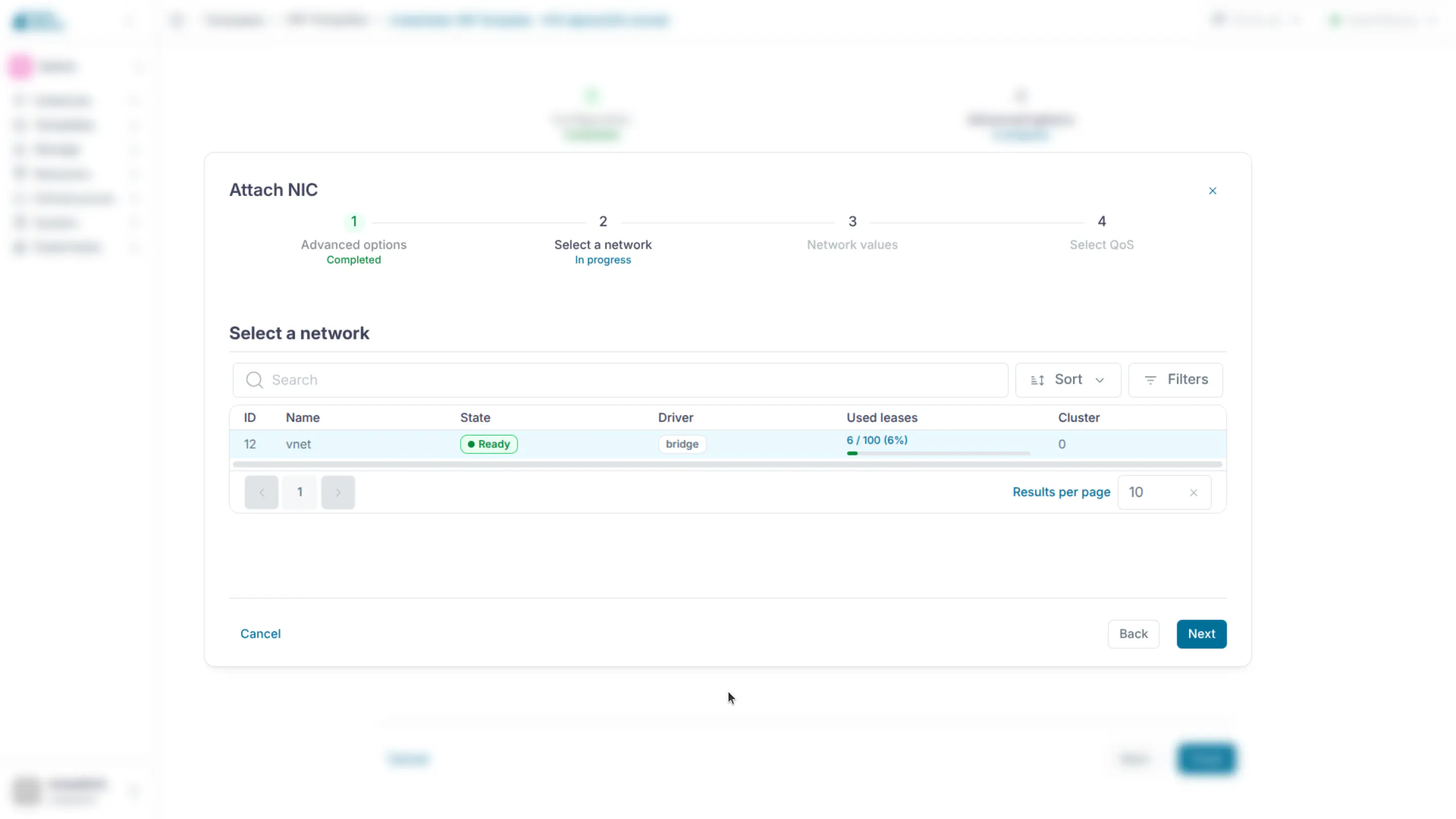
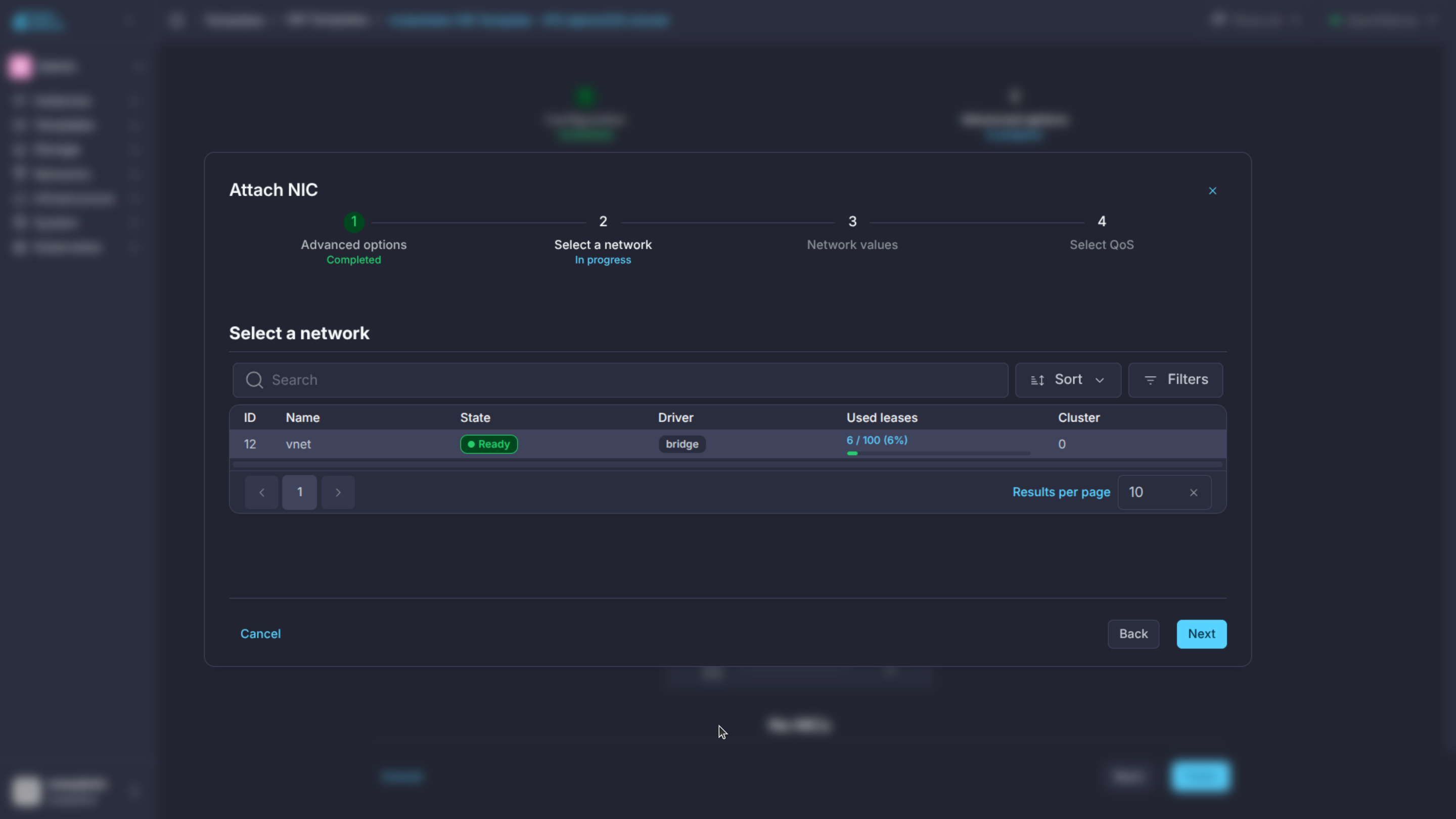
Network Section
- not supported for that hypervisor.
| NIC Sub-Attribute | Description | KVM | LXC |
|---|---|---|---|
NETWORK_ID |
ID of the network to attach this device, as defined by onevnet. Use if no NETWORK. |
M (No NETWORK) |
M (No NETWORK) |
NETWORK |
Name of the network to use (of those owned by user). Use if no NETWORK_ID. |
M (No NETWORK_ID) |
M (No NETWORK_ID) |
NETWORK_UID |
To select the NETWORK of a given user by its ID. |
O | O |
NETWORK_UNAME |
To select the NETWORK of a given user by its NAME. |
O | O |
IP |
Request a specific IP from the NETWORK. |
O | O |
MAC |
Request a specific HW address from the network interface. | O | O |
BRIDGE |
Name of the bridge the network device is going to be attached to. | O | O |
TARGET |
Name for the tun device created for the VM. | O | O |
SCRIPT |
Name of a shell script to be executed after creating the tun device for the VM. | O | O |
MODEL |
Hardware that will emulate this network interface. In KVM you can choose virtio to select its specific virtualization IO framework. |
O | - |
FILTER |
To define a network filtering rule for the interface. | O | O |
SECURITY_GROUPS |
Command-separated list of the ids of the security groups to be applied to this interface. | O | - |
INBOUND_AVG_BW |
Average bitrate for the interface in kilobytes/second for inbound traffic. | O | O |
INBOUND_PEAK_BW |
Maximum bitrate for the interface in kilobytes/second for inbound traffic. | O | O |
INBOUND_PEAK_KB |
Data that can be transmitted at peak speed in kilobytes. | O | - |
OUTBOUND_AVG_BW |
Average bitrate for the interface in kilobytes/second for outbound traffic. | O | O |
OUTBOUND_PEAK_BW |
Maximum bitrate for the interface in kilobytes/second for outbound traffic. | O | O |
OUTBOUND_PEAK_KB |
Data that can be transmitted at peak speed in kilobytes. | O | - |
NETWORK_MODE |
Network selection mode. Set to auto to let the Scheduler pick the VNET, or to dummy to create a KVM guest interface without attaching it to a Virtual Network. By default, the network mode is not set. |
O | O (auto only) |
SCHED_REQUIREMENTS |
Define the requirement when NETWORK_MODE is auto. |
O | O |
SCHED_RANK |
Define the rank when NETWORK_MODE is auto. |
O | O |
NAME |
Name of the NIC. | O | O |
PARENT |
It is used only on alias, it references the NIC which it is an alias of. | O | O |
PORTS and ICMP attributes require the firewall functionality to be configured. Please read the firewall configuration guide.
Here’s an example of a VM with two NICs attached to two different networks:
NIC = [ NETWORK_ID = 1 ]

NIC = [ NETWORK     = "Blue",
        NETWORK_UID = 0 ]

NIC = [ NETWORK_MODE = "auto",
        SCHED_REQUIREMENTS = "TRAFFIC_TYPE=\"public\"" ]
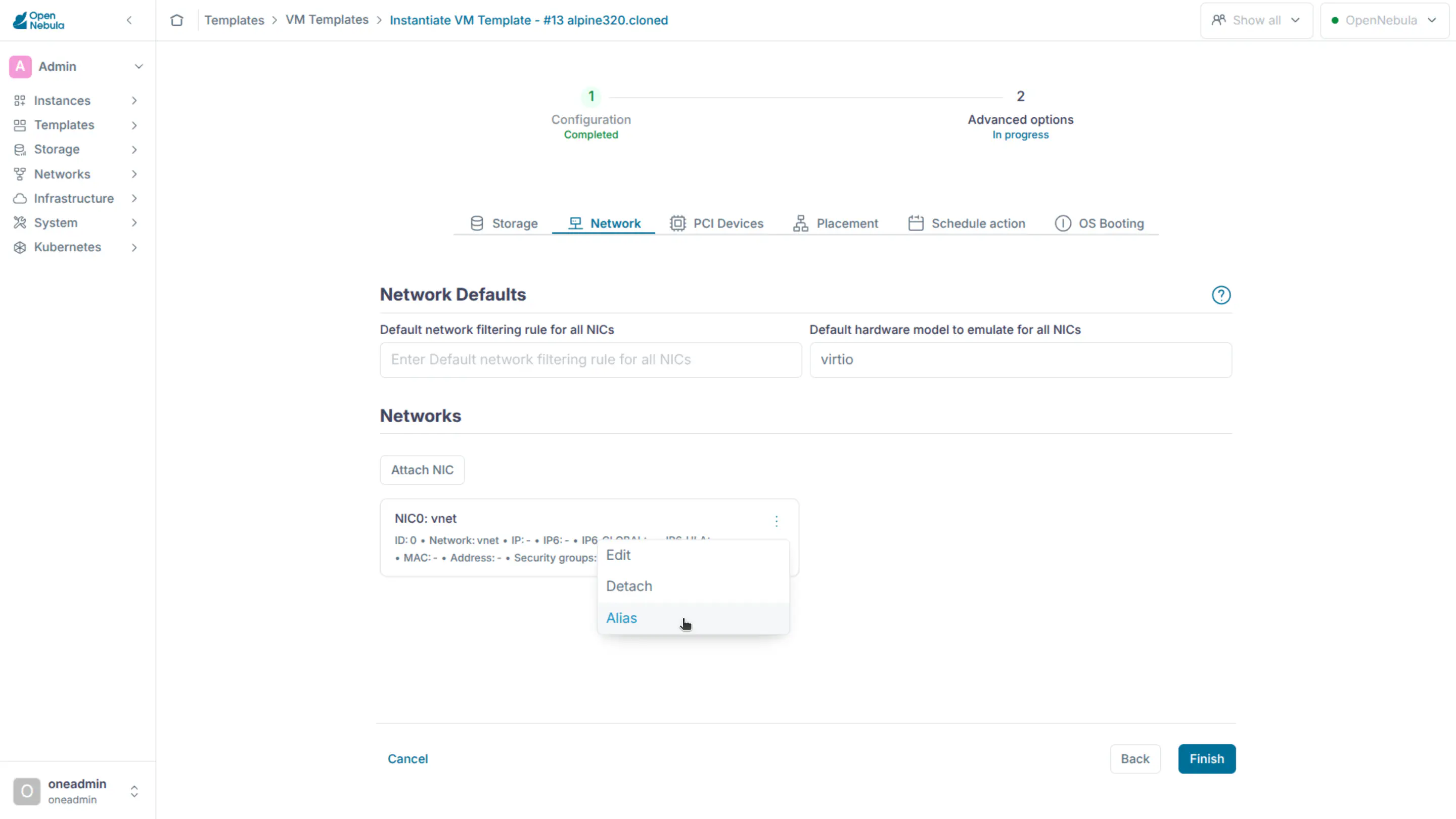
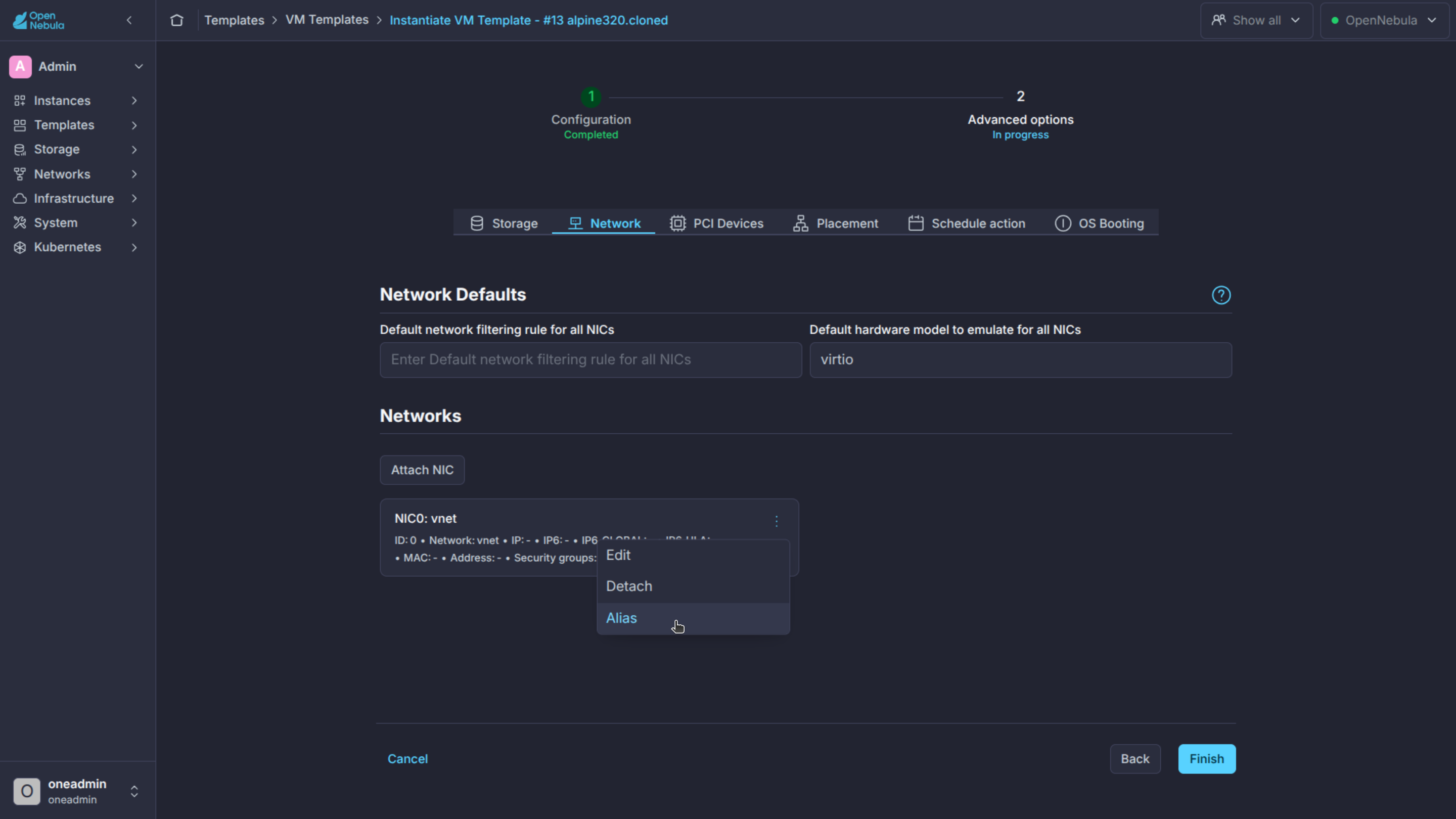
And here’s an example of a VM with two NICs attached, one is an alias of the other one:
NIC = [ NETWORK = "Test", NAME = "TestName" ]
NIC_ALIAS = [ NETWORK = "Test", PARENT = "TestName" ]
For more information on setting up virtual networks please check the Managing Virtual Networks guide.
Network Defaults
You can define a NIC_DEFAULT attribute with values that will be copied to each new NIC. This is especially useful for an administrator to define configuration parameters, such as MODEL, that final users may not be aware of.
NIC_DEFAULT = [ MODEL = "virtio" ]
I/O Devices Section
- not supported for that hypervisor.
The following I/O interfaces can be defined for a VM:
Attribute |
Description |
KVM |
vCenter |
LXC |
|---|---|---|---|---|
|
Define input devices, available sub-attributes:
|
O |
- |
- |
|
Whether the VM should export its graphical display and how, available sub-attributes: |
O |
O |
O |
|
O |
O |
O (vnc) |
|
|
O |
O |
O |
|
|
O |
O |
O |
|
|
O |
O |
O |
|
|
O |
O |
- |
|
|
O |
O |
O |
|
|
Defines a custom video device, available sub-attributes: |
O |
- |
- |
|
M |
- |
- |
|
|
O |
- |
- |
|
|
O |
- |
- |
|
|
O |
- |
- |
|
|
O |
- |
- |
vnc or 60 characters for spice.
For example:
GRAPHICS = [
  TYPE    = "vnc",
  LISTEN  = "0.0.0.0",
  PORT    = "5905"]
VNC_PORTS[START] + VMID, or the first lower available port. The VNC_PORTS[START] is specified inside the oned.conf file.
Context Section
- not supported for that hypervisor, or OS name where it is mandatory.
Context information is passed to the Virtual Machine via an ISO mounted as a partition. This information can be defined in the VM template in the optional section called Context, with the following attributes:
| Attribute | Description | KVM/LXC |
|---|---|---|
VARIABLE |
Variables that store values related to this Virtual Machine or others . The name of the variable is arbitrary (in the example, we use hostname). | O |
FILES |
Space-separated list of paths to include in context device. The location of the files are restricted by the CONTEXT_RESTRICTED_DIRS in oned.conf |
O |
FILES_DS |
Space-separated list of File Images to include in context device. | O |
INIT_SCRIPTS |
If the VM uses the OpenNebula contextualization package the init.sh file is executed by default. When the init script added is not called init.sh or more than one init script is added, this list contains the scripts to run and the order. Ex. “init.sh users.sh mysql.sh” | O |
START_SCRIPT |
Text of the script executed when the machine boots. It can contain shebang in case it is not a shell script. For example START_SCRImt="yum upgrade" or START_SCRImt="choco upgrade all" for Bash and PowerShell respectively |
O |
START_SCRIPT_BASE64 |
The same as START_SCRIPT but encoded in Base64. |
O |
TARGET |
Device to attach the context ISO. | - |
DEV_PREFIX |
Device prefix for the context ISO, either sd, or hd. |
- |
TOKEN |
YES to create a token.txt file for OneGate monitorization. |
O |
ONEGATE_ENDPOINT |
OpenNebula will automatically add this variable if TOKEN is YES. Defaults to http://169.254.16.9:5030. Value loaded from /etc/one/oned.conf |
O |
REPORT_READY |
The VM will send the READY signal to the onegate server. After this, the VM template will contain READY=YES in the USER_TEMPLATE section |
O |
READY_SCRIPT |
READY=YES will only be sent if the script is successfully executed |
Linux |
READY_SCRIPT_PATH |
Similar to READY_SCRIPT but the script exists in the Guest FS | Linux |
NETWORK |
YES to automatically fill the networking parameters for each NIC, used by the Contextualization packages. |
O |
NETCFG_TYPE |
Network configuration service inside guest VM responsible for configuring the NICs: empty (autodetects suitable service inside VM), bsd (for FreeBSD network configuration), interfaces (for Debian-style configuration via /etc/network/interfaces), netplan (for Netplan, set custom Netplan renderer via NETCFG_NETPLAN_RENDERER) networkd (for systemd-networkd), nm (for NetworkManager), scripts (for legacy Red Hat-style configuration via ifcfg-ethX files) |
Linux |
NETCFG_NETPLAN_RENDERER |
Netplan renderer (effective only when NETCFG_TYPE=netplan): empty or networkd (for systemd-networkd), NetworkManager (for NetworkManager) |
Linux |
SET_HOSTNAME |
This parameter value will be the hostname of the VM. | O |
DNS_HOSTNAME |
YES to set the VM hostname to the reverse dns name (from the first IP) |
O |
DNS |
Specific DNS server for the Virtual Machine. | O |
ETHx_MAC |
Used to find the correct interface. | O |
ETHx_IP |
IPv4 address for the interface. | O |
ETHx_IP6 |
IPv6 address for the interface. Legacy ETHx_IPV6 is also valid. |
O |
ETHx_IP6_PREFIX_LENGTH |
IPv6 prefix length for the interface. | O |
ETHx_IP6_ULA |
IPv6 unique local address for the interface | O |
ETHx_IP6_METRIC |
IP6_METRIC value for the IPv6 (default) route associated with this interface. |
Linux |
ETHx_IP6_METHOD |
IPv6 configuration method for the interface inside VM: static (for static address assignment based on context variables), auto (for SLAAC), dhcp (for SLAAC and DHCPv6), disable (for disabling IPv6), skip (skip IPv6 NIC configuration), empty defaults to content of ETHx_METHOD set for IPv4 |
O |
ETHx_METHOD |
IPv4 configuration method for the interface inside VM: empty or static (for static address assignment based on context variables), dhcp (for DHCPv4), skip (skip IPv4 NIC configuration) |
O |
ETHx_NETWORK |
Network address of the interface. | O |
ETHx_MASK |
Network mask. | O |
ETHx_GATEWAY |
Default IPv4 gateway for the interface. | O |
ETHx_GATEWAY6 |
Default IPv6 gateway for the interface. | O |
ETHx_ROUTES |
Comma-separated list of custom routes for the interface. Format: <dst_network2> via <gateway1>, <dst_network2> via <gateway2> |
O |
ETHx_MTU |
MTU value for the interface. |
O |
ETHx_METRIC |
METRIC value for the (default) route associated with this interface. |
O |
ETHx_DNS |
DNS for the network. | O |
ETHx_ALIASy_MAC |
Used to find the correct interface. | O |
ETHx_ALIASy_IP |
IPv4 address for the alias. | O |
ETHx_ALIASy_IP6 |
IPv6 address for the alias. Legacy ETHx_ALIASy_IPV6 is also valid. |
O |
ETHx_ALIASy_IP6_PREFIX_LENGTH |
IPv6 prefix length for the alias. | O |
ETHx_ALIASy_IP6_ULA |
IPv6 unique local address for the alias. | O |
ETHx_ALIASy_IP6_METHOD |
IP6_METHOD value for the alias. |
- |
ETHx_ALIASy_IP6_METRIC |
IP6_METRIC value for the alias. |
- |
ETHx_ALIASy_NETWORK |
Network address of the alias. | O |
ETHx_ALIASy_MASK |
Network mask. | O |
ETHx_ALIASy_GATEWAY |
Default IPv4 gateway for the alias. | - |
ETHx_ALIASy_GATEWAY6 |
Default IPv6 gateway for the alias. | - |
ETHx_ALIASy_MTU |
MTU value for the alias. |
- |
ETHx_ALIASy_METHOD |
METHOD value for the alias. |
- |
ETHx_ALIASy_METRIC |
METRIC value for the alias. |
- |
ETHx_ALIASy_DNS |
DNS for the alias. | - |
USERNAME |
User to be created in the guest OS. If any password or SSH_PUBLIC_KEY attribute is defined (see below) it will change this user (defaults to root). |
Linux |
CRYPTED_PASSWORD_BASE64 |
Crypted password encoded in base64. To be set for the user USERNAME. |
Linux |
PASSWORD_BASE64 |
Password encoded in base64. To be set for the user USERNAME. |
O |
CRYPTED_PASSWORD |
Crypted password. To be set for the user USERNAME. This parameter is not recommended, use CRYPTED_PASSWORD_BASE64 instead. |
Linux |
PASSWORD |
Password to be set for the user USERNAME. This parameter is not recommended, use PASSWORD_BASE64 instead. |
O |
SSH_PUBLIC_KEY |
Key to be added to USERNAME authorized_keys file or root in case USERNAME is not set. Requires OpenSSH server installed on Windows, user automatically detected. USERNAME ignored. |
O |
ENABLE_SSH |
Set to NO to disable the automatic startup of the sshd service (if installed). |
Windows |
WINADMIN |
Set to NO to treat the Windows user as standard user for setting SSH_PUBLIC_KEY. |
Windows |
SECURETTY |
If set to NO it will disable securetty validation on PAM. If set to YES it will restore system defaults. Defaults: LXC -> YES, KVM -> NO. |
Linux |
TIMEZONE |
Time zone to set. On Linux, the name must match the zone file name relative to /usr/share/zoneinfo/ (e.g. US/Central). On Windows, the name must match supported zone listed by tzutil /l (e.g. Central Standard Time). |
O |
GROW_ROOTFS |
If set to NO, the automatic growing of the root filesystem or disk C: on Windows will be disabled. |
O |
GROW_FS |
Mountpoints on Linux (e.g.: /mnt/disk /data) or drive letters on Windows (e.g.: X: Y:) of all the extra filesystems which should be extended. The rootfs / on Linux or disk C: on Windows is implied (automatically added) if GROW_ROOTFS is left empty or set to YES. |
O |
IGNORE_SWAP |
If set to YES then one-contexd service will skip auto-mounting of any found swap devices (this does not affect swap defined in /etc/fstab). |
Linux |
RECREATE_RUN |
If set to YES, missing directories and files persisted in the Image in /run (or /var/run) are restored and copied to the ephemeral /run (or /var/run) of the VM instance. |
Linux |
EJECT_CDROM |
Value YES will signal to eject the CD with the context.sh file when (re)contextualization is finished. |
Windows |
By default, FireEdge does not allow you to create or modify the START_SCRIPT field. It can only be modified if the START_SCRIPT_BASE64 field does not exist.
FireEdge prioritises the START_SCRIPT_BASE64 field when the form field is filled in.
The values referred to by VARIABLE can be defined as:
Hardcoded values:
SET_HOSTNAME = "MAINHOST"
Using template variables
$<template_variable>: any single value variable of the VM template, for example:
IP_GEN       = "10.0.0.$VMID"
SET_HOSTNAME = "$NAME"
$<template_variable>[<attribute>]: Any single value contained in a multiple value variable in the VM template, for example:
IP_PRIVATE = $NIC[IP]
$<template_variable>[<attribute>, <attribute2>=<value2>]: Any single value contained in the variable of the VM template, setting one attribute to discern between multiple variables called the same way, for example:
IP_PUBLIC = "$NIC[IP, NETWORK=\"Public\"]"
Using Virtual Network template variables
$NETWORK[<vnet_attribute>, <NETWORK_ID|NETWORK|NIC_ID>=<vnet_id|vnet_name|nic_id>]: Any single value variable in the Virtual Network template, for example:
DNS = "$NETWORK[DNS, NETWORK_ID=3]"
TEMPLATE to include the whole vnet template in XML (base64-encoded).
Using Image template variables
$IMAGE[<image_attribute>, <IMAGE_ID|IMAGE>=<img_id|img_name>]: Any single value variable in the Image template, for example:
root = "$IMAGE[ROOT_PASS, IMAGE_ID=0]"
TEMPLATE to include the whole image template in XML (base64-encoded).
Using User template variables
$USER[<user_attribute>]: Any single value variable in the user (owner of the VM) template, for example:
ssh_key = "$USER[SSH_KEY]"
TEMPLATE to include the whole user template in XML (base64-encoded).
Pre-defined variables, apart from those defined in the template you can use:
$UID, the uid of the VM owner.$UNAME, the name of the VM owner.$GID, the id of the VM owner’s group.$GNAME, the name of the VM owner’s group.$TEMPLATE, the whole template in XML format and encoded in base64.
FILES_DS, each file must be registered in a FILE_DS datastore and has to be of type CONTEXT. Use the following to select files from Files Datastores:
$FILE[IMAGE=<image name>], to select the user’s own files.$FILE[IMAGE=<image name>, <IMAGE_UNAME|IMAGE_UID>=<owner name|owner id>], to select images owned by other users, by user name or UID.$FILE[IMAGE_ID=<image id>], global file selection.
For example:
CONTEXT = [
  SET_HOSTNAME = "MAINHOST",
  IP_PRIVATE   = "$NIC[IP]",
  DNS          = "$NETWORK[DNS, NAME=\"Public\"]",
  IP_GEN       = "10.0.0.$VMID",
  FILES        = "/service/init.sh /service/certificates /service/service.conf",
  FILES_DS     = "$FILE[IMAGE_ID=34] $FILE[IMAGE=\"kernel\"]",
  TARGET       = "sdc"
]
Placement Section
The following attributes sets placement constraints and preferences for the VM, valid for all hypervisors:
| Attribute | Description |
|---|---|
SCHED_REQUIREMENTS |
Boolean expression that rules out provisioning Hosts from list of machines suitable to run this VM. |
SCHED_RANK |
This field sets which attribute will be used to sort the suitable Hosts for this VM. Basically, it defines which Hosts are more suitable than others. |
SCHED_DS_REQUIREMENTS |
Boolean expression that rules out entries from the pool of datastores suitable to run this VM. |
SCHED_DS_RANK |
States which attribute will be used to sort the suitable datastores for this VM. Basically, it defines which datastores are more suitable than others. |
USER_PRIORITY |
Alter the standard FIFO ordering to dispatch VMs. VMs with a higher USER_PRIORITY will be dispatched first. |
For example:
SCHED_REQUIREMENTS    = "CPUSPEED > 1000"
SCHED_RANK            = "FREE_CPU"
SCHED_DS_REQUIREMENTS = "NAME=GoldenCephDS"
SCHED_DS_RANK         = FREE_MB
Requirement Expression Syntax
The syntax of the requirement expressions is defined as:
stmt::= expr';'
expr::= VARIABLE '=' NUMBER
      | VARIABLE '!=' NUMBER
      | VARIABLE '>' NUMBER
      | VARIABLE '<' NUMBER
      | VARIABLE '@>' NUMBER
      | VARIABLE '=' STRING
      | VARIABLE '!=' STRING
      | VARIABLE '@>' STRING
      | expr '&' expr
      | expr '|' expr
      | '!' expr
      | '(' expr ')'
Each expression is evaluated to 1 (TRUE) or 0 (FALSE). Only those Hosts for which the requirement expression is evaluated to TRUE will be considered to run the VM.
Logical operators work as expected ( less ‘<’, greater ‘>’, ‘&’ AND, ‘|’ OR, ‘!’ NOT), ‘=’ means equals with numbers (floats and integers). When you use ‘=’ operator with strings, it performs a shell wildcard pattern matching. Additionally, the ‘@>’ operator means contains, if the variable evaluates to an array the expression will be true if that array contains the given number or string (or any string that matches the provided pattern).
Any variable included in the Host template or its Cluster template can be used in the requirements. You may also use an XPath expression to refer to the attribute.
There is a special variable, CURRENT_VMS, that can be used to deploy VMs in a Host where other VMs are (not) running. It can be used only with the operators ‘=’ and ‘!=’.
Examples:
# Only aquila hosts (aquila0, aquila1...), note the quotes
SCHED_REQUIREMENTS = "NAME = \"aquila*\""

# Only those resources with more than 60% of free CPU
SCHED_REQUIREMENTS = "FREE_CPU > 60"

# Deploy only in the Host where VM 5 is running. Two different forms:
SCHED_REQUIREMENTS = "CURRENT_VMS = 5"
SCHED_REQUIREMENTS = "\"HOST/VMS/ID\" @> 5"

# Deploy in any Host, except the ones where VM 5 or VM 7 are running
SCHED_REQUIREMENTS = "(CURRENT_VMS != 5) & (CURRENT_VMS != 7)"

# Use any datastore that is in cluster 101 (it list of cluster IDs contains 101)
SCHED_DS_REQUIREMENTS = "\"CLUSTERS/ID\" @> 101"
SCHED_REQUIREMENTS = "HYPERVISOR=\"LXC\""
$<template_variable>: any single value variable of the VM template.$<template_variable>[<attribute>]: Any single value contained in a multiple value variable in the VM template.$<template_variable>[<attribute>, <attribute2>=<value2>]: Any single value contained in a multiple value variable in the VM template, setting one attribute to discern between multiple variables called the same way.
For example, if you have a custom probe that generates a MACS attribute for the Hosts, you can do short of a MAC pinning, so only VMs with a given MAC runs in a given Host.
SCHED_REQUIREMENTS = "MAC=\"$NIC[MAC]\""
Rank Expression Syntax
The syntax of the rank expressions is defined as:
stmt::= expr';'
expr::= VARIABLE
      | NUMBER
      | expr '+' expr
      | expr '-' expr
      | expr '*' expr
      | expr '/' expr
      | '-' expr
      | '(' expr ')'
Rank expressions are evaluated using each Host’s information. ‘+’, ‘-’, ‘*’, ‘/’ and ‘-’ are arithmetic operators. The rank expression is calculated using floating point arithmetic and then rounded to an integer value.
Here are some examples:
# First those resources with a higher Free CPU
  SCHED_RANK = "FREE_CPU"

# Consider also the CPU temperature
  SCHED_RANK = "FREE_CPU * 100 - TEMPERATURE"
Predefined Host Attributes
There are some predefined Host attributes that can be used in the requirements and rank expressions, valid for all hypervisors:
| Attribute | Description |
|---|---|
NAME |
Hostname. |
MAX_CPU |
Total CPU in the Host, in (# cores * 100). |
CPU_USAGE |
Allocated used CPU in (# cores * 100). This value is the sum of all the CPU requested by VMs running on the Host, and is updated instantly each time a VM is deployed or undeployed. |
FREE_CPU |
Real free CPU in (# cores * 100), as returned by the probes. This value is updated each monitorization cycle. |
USED_CPU |
Real used CPU in (# cores * 100), as returned by the probes. USED_CPU = MAX_CPU - FREE_CPU. This value is updated each monitorization cycle. |
MAX_MEM |
Total memory in the Host, in KB. |
MEM_USAGE |
Allocated used memory in KB. This value is the sum of all the memory requested by VMs running on the Host, and is updated instantly each time a VM is deployed or undeployed. |
FREE_MEMORY |
Real free memory in KB, as returned by the probes. This value is updated each monitorization cycle. |
USED_MEMORY |
Real used memory in KB, as returned by the probes. USED_MEMORY = MAX_MEM - FREE_MEMORY. This value is updated each monitorization cycle. |
RUNNING_VMS |
Number of VMs deployed on this Host. |
HYPERVISOR |
Hypervisor name. |
You can execute onehost show <id> -x to see all the attributes and their values.
Hypervisor Section
You can also tune several low-level hypervisor attributes.
The RAW attribute (optional) section of the VM template is used pass VM information directly to the underlying hypervisor. Anything placed in the data attribute gets passed straight to the hypervisor unmodified.
| Attribute | Description | KVM | LXC |
|---|---|---|---|
TYPE |
Possible values are: kvm, lxc. |
O | O |
VALIDATE |
Validate DATA against XML schema, possible values yes, no. Default value yes. |
O | - |
DATA |
Raw data to be passed directly to the hypervisor. | O | O |
DATA_VMX |
Raw data to be added directly to the .vmx file. |
- | . |
For example:
RAW = [
    type = "kvm",
    validate = "yes",
    data = "<devices><serial type=\"pty\"><source path=\"/dev/pts/5\"/><target port=\"0\"/></serial><console type=\"pty\" tty=\"/dev/pts/5\"><source path=\"/dev/pts/5\"/><target port=\"0\"/></console></devices>"
]
RAW = [
    type = "lxc",
    data = "boot.autostart": "true", "limits.processes": "10000"
]
Additionally the following can be also set for KVM:
| Attribute | Description |
|---|---|
EMULATOR |
Path to the emulator binary to use with this VM. |
For example:
EMULATOR="/usr/bin/qemu-system-aarch64"
Restricted Attributes
All the default restricted attributes to users in the oneadmin group are summarized in:
CONTEXT/FILESNIC/VLAN_IDNIC/BRIDGENIC/FILTERNIC/FILTER_IP_SPOOFINGNIC/FILTER_MAC_SPOOFINGNIC/INBOUND_AVG_BWNIC/INBOUND_PEAK_BWNIC/INBOUND_PEAK_KBNIC/OUTBOUND_AVG_BWNIC/OUTBOUND_PEAK_BWNIC/OUTBOUND_PEAK_KBNIC/OPENNEBULA_MANAGEDNIC/EXTERNALNIC_ALIAS/MACNIC_ALIAS/VLAN_IDNIC_ALIAS/BRIDGENIC_ALIAS/INBOUND_AVG_BWNIC_ALIAS/INBOUND_PEAK_BWNIC_ALIAS/INBOUND_PEAK_KBNIC_ALIAS/OUTBOUND_AVG_BWNIC_ALIAS/OUTBOUND_PEAK_BWNIC_ALIAS/OUTBOUND_PEAK_KBNIC_ALIAS/OPENNEBULA_MANAGEDNIC_DEFAULT/MACNIC_DEFAULT/VLAN_IDNIC_DEFAULT/BRIDGENIC_DEFAULT/FILTERNIC_DEFAULT/EXTERNALDISK/TOTAL_BYTES_SECDISK/TOTAL_BYTES_SEC_MAX_LENGTHDISK/TOTAL_BYTES_SEC_MAXDISK/READ_BYTES_SECDISK/READ_BYTES_SEC_MAX_LENGTHDISK/READ_BYTES_SEC_MAXDISK/WRITE_BYTES_SECDISK/WRITE_BYTES_SEC_MAX_LENGTHDISK/WRITE_BYTES_SEC_MAXDISK/TOTAL_IOPS_SECDISK/TOTAL_IOPS_SEC_MAX_LENGTHDISK/TOTAL_IOPS_SEC_MAXDISK/READ_IOPS_SECDISK/READ_IOPS_SEC_MAX_LENGTHDISK/READ_IOPS_SEC_MAXDISK/WRITE_IOPS_SECDISK/WRITE_IOPS_SEC_MAX_LENGTHDISK/WRITE_IOPS_SEC_MAXDISK/SIZE_IOPS_SECDISK/OPENNEBULA_MANAGEDDISK/SIZEDISK/ORIGINAL_SIZEDISK/SIZE_PREVDEPLOY_IDCPU_COSTMEMORY_COSTDISK_COSTPCIEMULATORRAWUSER_PRIORITYUSER_INPUTS/CPUUSER_INPUTS/MEMORYUSER_INPUTS/VCPUTOPOLOGY/PIN_POLICYTOPOLOGY/HUGEPAGE_SIZE
These attributes can be configured in oned.conf.
User Inputs
USER_INPUTS provides the template creator with the possibility to dynamically ask the user instantiating the template for dynamic values that must be defined.
USER_INPUTS = [
  BLOG_TITLE="M|text|Blog Title",
  MYSQL_PASSWORD="M|password|MySQL Password",
  INIT_HOOK="M|text64|You can write a script that will be run on startup",
  <VAR>="M|<type>|<desc>"
]

CONTEXT=[
  BLOG_TITLE="$BLOG_TITLE",
  MYSQL_PASSWORD="$MYSQL_PASSWORD" ]
Note that the CONTEXT references the variables defined in the USER_INPUTS so the value is injected into the VM.
Valid types:
| Types | Value | Description |
|---|---|---|
| text | <VAR>=”M|text| <desc>| | <default>” |
A string |
| text64 | <VAR>=”M|text64| <desc>| | <default>” |
text64 will encode the user’s response in Base64 |
| password | <VAR>=”M|password| <desc>” |
|
| number | <VAR>=”M|number| <desc>| | <default>” |
An integer |
| float | <VAR>=”M|number-float| <desc>| | <default>” |
A float |
| range | <VAR>=”M|range| <desc>|<min>..<max>| <default>” |
A range of integers |
| range (float) | <VAR>=”M|range-float| <desc>|<min>..<max>|<default>” |
A range of floats |
| list | <VAR>=”M|list| <desc>|<v1>,<v2>,<v3>|<default>” |
A list |
| list-multiple | <VAR>=”M|list-multiple| <desc>|<v1>,<v2>,<v3>|<default>|” |
A list with multiple values |
| boolean | <VAR>=”M|boolean| <desc>| | <default>” |
Yes or no |
| fixed | <VAR>=”M|fixed| <desc>| | <value>” |
A fixed value, cannot be changed |
There is the possibility of making the USER_INPUT mandatory or not mandatory. If it is mandatory, we will see a letter ‘M’ but if it is not mandatory a letter ‘O’ will appear. For example:
<VAR>=”M|...This is mandatory<VAR>=”O|...This is not mandatory
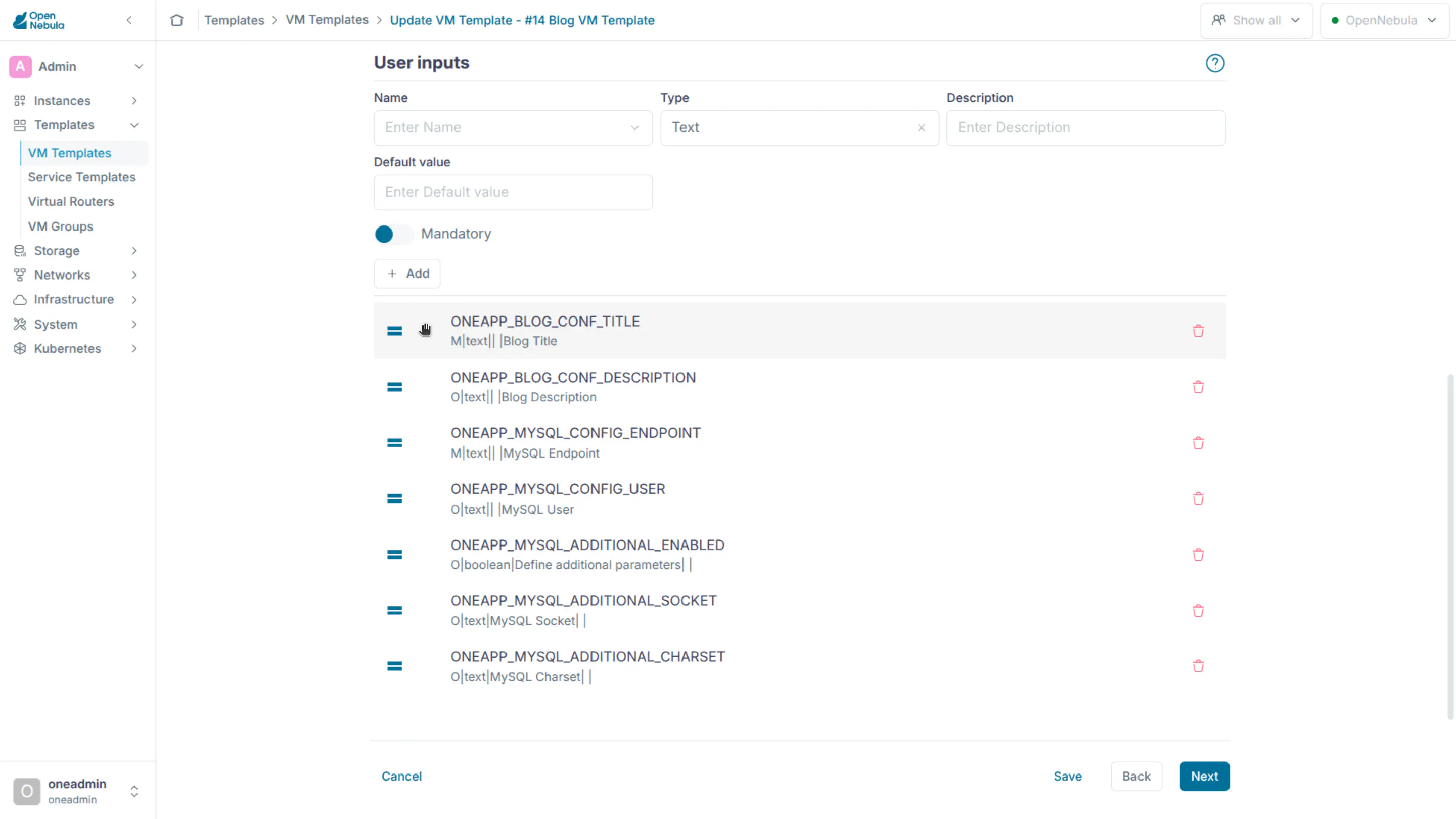
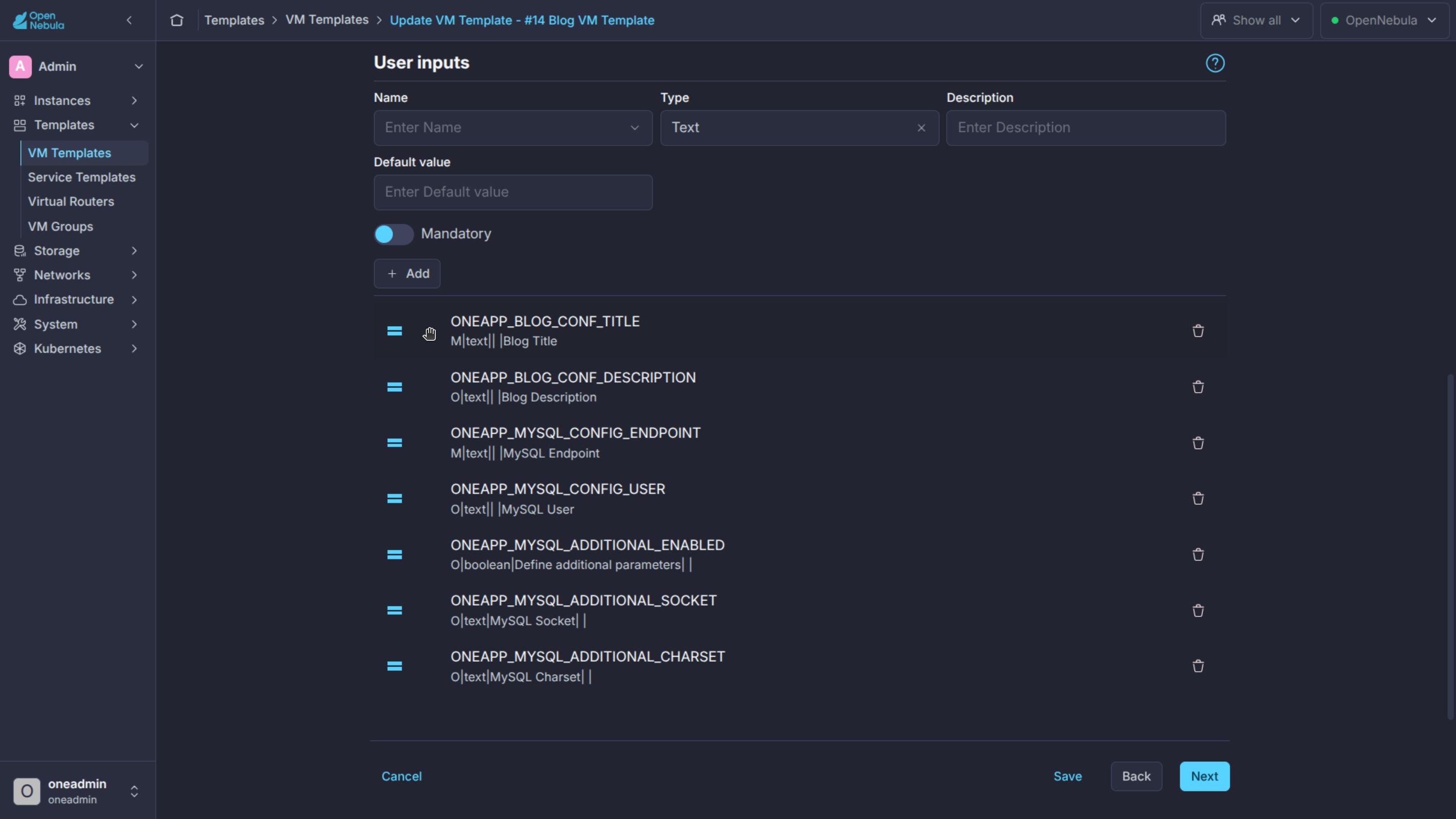
In Sunstone, the USER_INPUTS can be ordered with the mouse.
USER_INPUTS_METADATA provides the template creator with the possibility to add titles and descriptions to the user inputs. To understand how Sunstone renders user inputs metadata, see User Inputs in Sunstone.
USER_INPUTS_METADATA will only be used in Sunstone, not in other components of OpenNebula.
| Attribute | Mandatory | Description |
|---|---|---|
TYPE |
Yes | Type of the metadata. Possible values: APP or GROUP. |
NAME |
Yes | Name of the user input. It has to be an existing user input name in the same template. |
TITLE |
No | In the case of APP is the text that will be shown to the user in a Sunstone tab. In the case of GROUP is the text that will be shown to the user in a Sunstone group. |
DESCRIPTION |
No | In the case of APP is a text info note that will be shown in the APP tab. In the case of GROUP is the text that will be shown as info text in the Sunstone group. |
Here’s an example:
USER_INPUTS_METADATA=[
  DESCRIPTION="This tab includes all the information about the blog section in this template.",
  NAME="BLOG",
  TITLE="Blog",
  TYPE="APP" ]
USER_INPUTS_METADATA=[
  NAME="MYSQL",
  TITLE="MySQL",
  TYPE="APP" ]
USER_INPUTS_METADATA=[
  DESCRIPTION="MySQL configuration parameters",
  NAME="CONFIG",
  TITLE="Configuration",
  TYPE="GROUP" ]
USER_INPUTS_METADATA=[
  DESCRIPTION="Additional MySQL parameters",
  NAME="ADDITIONAL",
  TITLE="Additional parameters",
  TYPE="GROUP" ]
Schedule Actions Section
The following attributes can used to define punctual or relative actions for the VM.
| Attribute | Description |
|---|---|
TIME |
Time in seconds to start the action. Can be defined as relative value +sec from the VM start, OpenNebula computes and stores absolute value. |
WARNING |
Time in seconds (can be relative +sec from the VM start), for the CLI and Sunstone to highlight the action, because it will be executed soon. |
REPEAT |
Define the granularity of the action [ WEEKLY = 0 , MONTHLY = 1 , YEARLY = 2 , HOURLY = 3 ]. |
DAYS |
Sets the frequency for recurring actions. The specific values depend on the REPEAT mode, i.e. for yearly periods DAYS=”1,365” would mean the first and last day of the year. |
ACTION |
The action that will be executed. |
ARGS |
Additional arguments for the action (no need to define the VM_ID) |
END_TYPE |
When the users want to end the action [ NEVER = 0 , NUMBER OF REPETITIONS = 1 , DATE = 2 ]. |
END_VALUE |
The value for END_TYPE attribute, can be a number or a date. |
For example:
SCHED_ACTION=[
    ACTION="suspend",
    DAYS="1,5",
    END_TYPE="1",
    END_VALUE="5",
    ID="0",
    REPEAT="0",
    TIME="1537653600",
    WARNING="1537567200" ]
NUMA topology Section
The following attributes can use to define a NUMA topology for the VM.
| TOPOLOGY attribute | Description |
|---|---|
PIN_POLICY |
vCPU pinning preference: CORE, THREAD, SHARED, NONE. |
SOCKETS |
Number of sockets or NUMA nodes. |
CORES |
Number of cores per node. |
THREADS |
Number of threads per core. |
HUGEPAGE_SIZE |
Size of the hugepages (MB). If not defined no hugepages will be used. |
MEMORY_ACCESS |
Control if the memory is to be mapped shared or private. |
For example:
TOPOLOGY = [
  HUGEPAGE_SIZE = "2",
  MEMORY_ACCESS = "shared",
  NUMA_NODES    = "2",
  PIN_POLICY    = "THREAD" ]
Asymmetric NUMA configurations, i.e., not distributing the VM resources evenly across the nodes, can be defined manually by setting the NUMA_NODE attribute:
| NUMA_NODE attribute | Description |
|---|---|
MEMORY |
Memory allocated in the node, in MB. |
TOTAL_CPUS |
Total number of CPU units, CORE*THREADS. |
For example:
TOPOLOGY = [ PIN_POLICY = CORE, SOCKETS = 2 ]

NUMA_NODE = [ MEMORY = 1024, TOTAL_CPUS = 2 ]
NUMA_NODE = [ MEMORY = 2048, TOTAL_CPUS = 4 ]
Please check the NUMA guide for more information.
TPM Section
The following attributes can be used to attach a TPM to the VM.
| TPM attribute | Description | KVM | vCenter | LXC |
|---|---|---|---|---|
MODEL |
vTPM device model: tpm-crb, tpm-tis. |
O | - | - |
Example:
TPM = [
  MODEL = "tpm-crb" ]
That will translate to the following libvirt stanza:
<tpm model='tpm-crb'>
    <backend type='emulator' version='2.0'/>
    <alias name='tpm0'/>
</tpm>
Please check the TPM guide for more information.
Sunstone Section
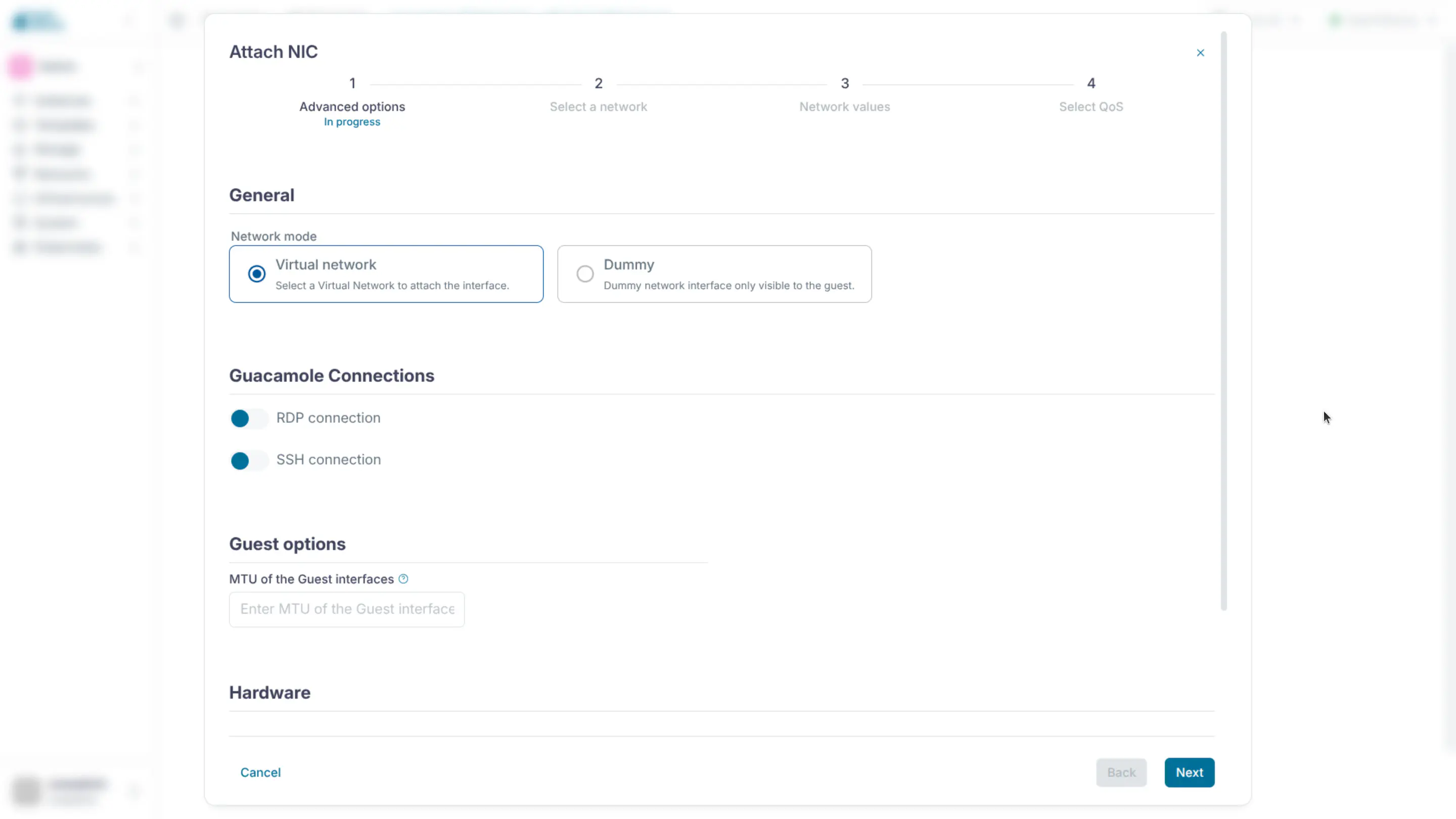
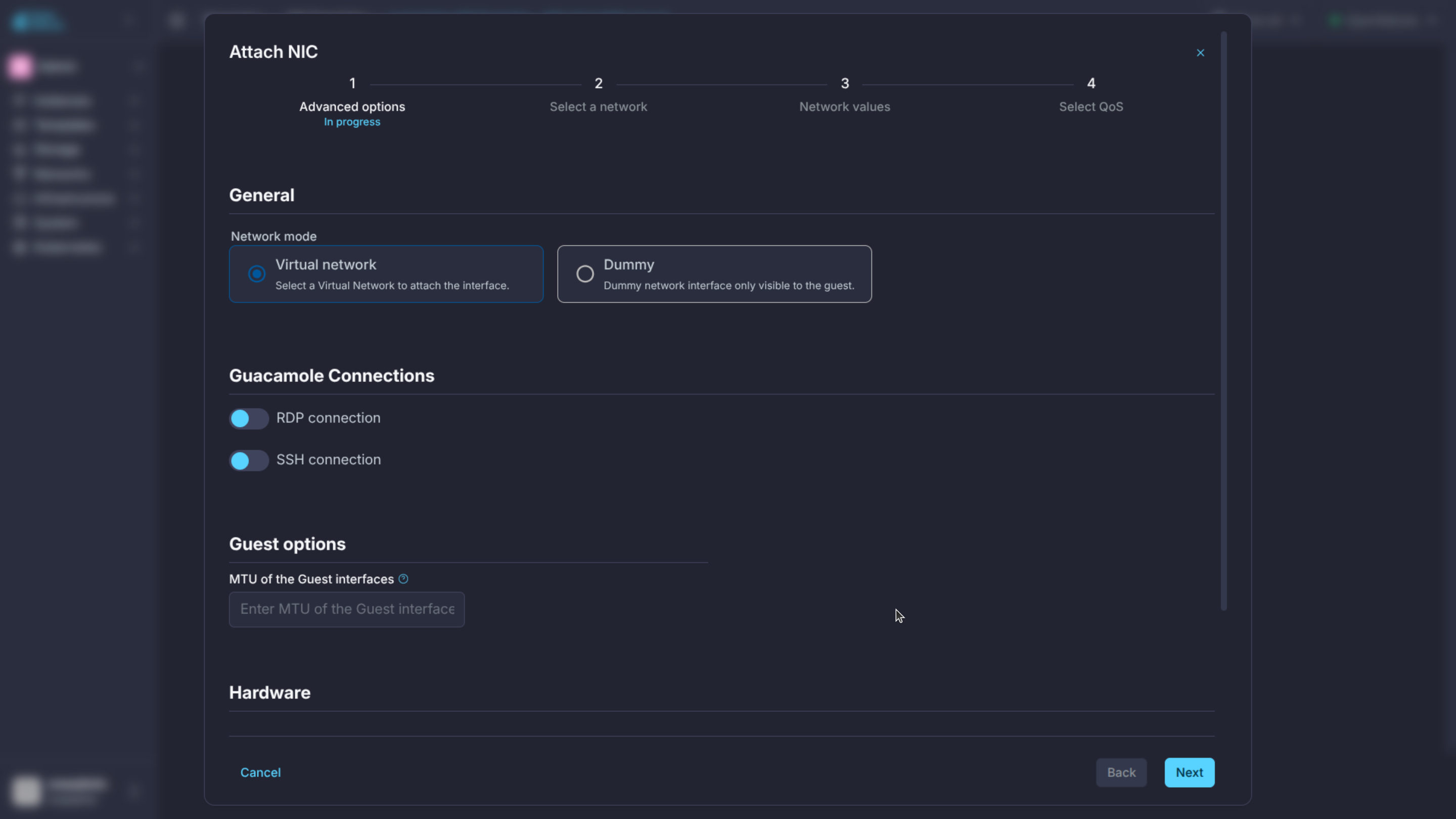
The following attributes are used to display elements in Sunstone:
| Attribute | Description |
|---|---|
NETWORK_ALIAS |
Disable interface network type (alias) |
NETWORK_AUTO |
Disable interface network selection (Automatic selection) |
NETWORK_RDP |
Disable interface network RDP connection (active) |
NETWORK_SSH |
Disable interface network SSH connection (active) |
NETWORK_SELECT |
Disable Network selection for VM on instantiation |
For example:
SUNSTONE = [
  NETWORK_ALIAS = "yes",
  NETWORK_AUTO = "no",
  NETWORK_RDP = "yes",
  NETWORK_SSH = "yes"
]
GIVE FEEDBACK
Was this resource helpful?
Glad to hear it
Sorry to hear that